
What Is Calendly? How It Works, Features and Pricing (2026)
Published October 21, 2026
At a glance
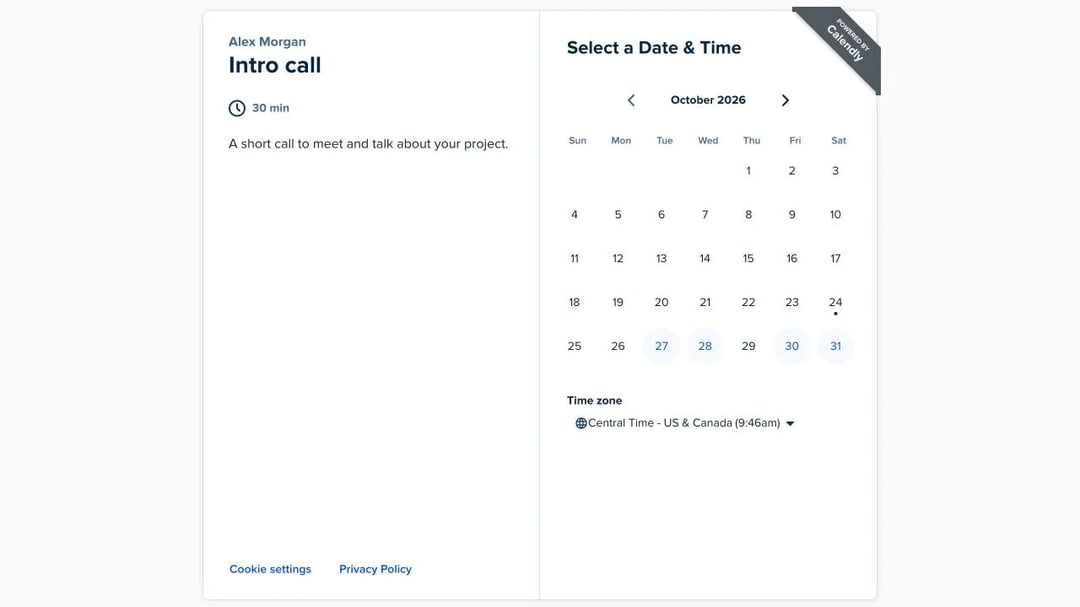
Calendly is an online scheduling app. You connect your calendar, choose the hours you're free and share a link. People open the link, pick a time that suits them, and the meeting lands on both calendars, with no back-and-forth emails.
That's the idea behind one of the best-known names in scheduling. Tope Awotona founded Calendly in 2013, and the company says more than 50 million people in over 240 countries now use it. But what you can do with it depends a lot on the plan you're on. We used Calendly in a real free account in October 2026 to show you how it works for you and for your guests, what it costs, and where it falls short.
Table of contents
What is Calendly used for?
Calendly replaces the "When are you free?" email thread. Instead of trading times, you send one link, and the other person books a slot that's open in your calendar. People use it for:
- Sales calls and demos. Prospects book a call from an email or a website, without waiting for a reply.
- Job interviews. Candidates pick their own interview time.
- Client meetings. Consultants, coaches and freelancers share a link for intro calls and sessions.
- Office hours. Teachers and managers open a few slots a week for anyone who needs them.
- Group plans. A meeting poll lets a group vote on a time.
It isn't a video tool, though. Calendly books the meeting and adds a Zoom, Google Meet or Microsoft Teams link to it, but the call itself happens in that video app.
How does Calendly work?
Setting up Calendly takes 4 steps. Here's what each one looks like in the app.
1. Connect your calendar
When you sign up with Google or Microsoft, Calendly connects that calendar. It checks the calendar before it offers a time, so nobody can book you when you're already busy. On the free plan, Calendly checks only 1 calendar, so a second work or personal calendar stays invisible to it.
2. Create an event type
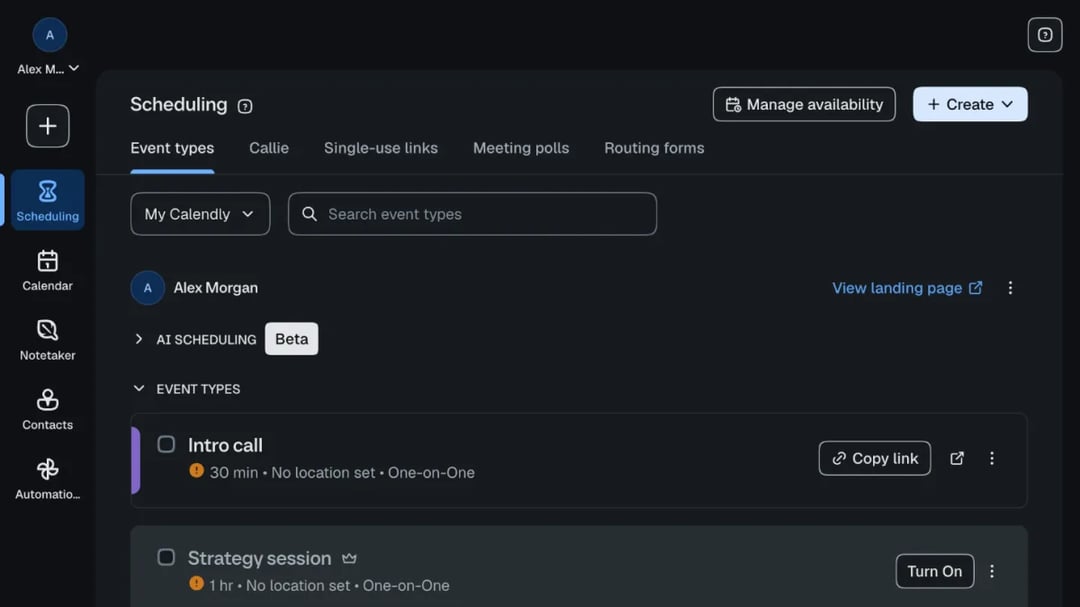
An event type is one kind of meeting, such as a "30-minute intro call". In the app, the "Create" button offers:
- One-on-one: "1 host → 1 invitee", the classic booking link.
- Group: "1 host → Multiple invitees", for webinars and classes (paid plans only).
- One-off meeting: "Offer time outside your normal schedule".
- Meeting poll: "Let invitees vote on a time to meet".
Each event type has a length, a location (such as Zoom or a phone call) and a few questions for the person who books.
3. Set your availability
Next, tell Calendly when you take meetings. A new event type uses your "Working hours" schedule, and by default "Invitees can schedule 60 days into the future with at least 4 hours notice". You can add buffer time between meetings, cap how many meetings you take a day, and block out dates when you're away.
4. Share your link
Every event type gets its own link, and your account has a main page that lists them all. Paste the link into an email, add it to your website, or put it in your email signature. Our guide to your Calendly link shows every way to find, share and change it.
What your guests see
Your guest opens the link and sees your name, the meeting and a calendar. They pick a day, and the open times appear next to it, already in their own time zone.
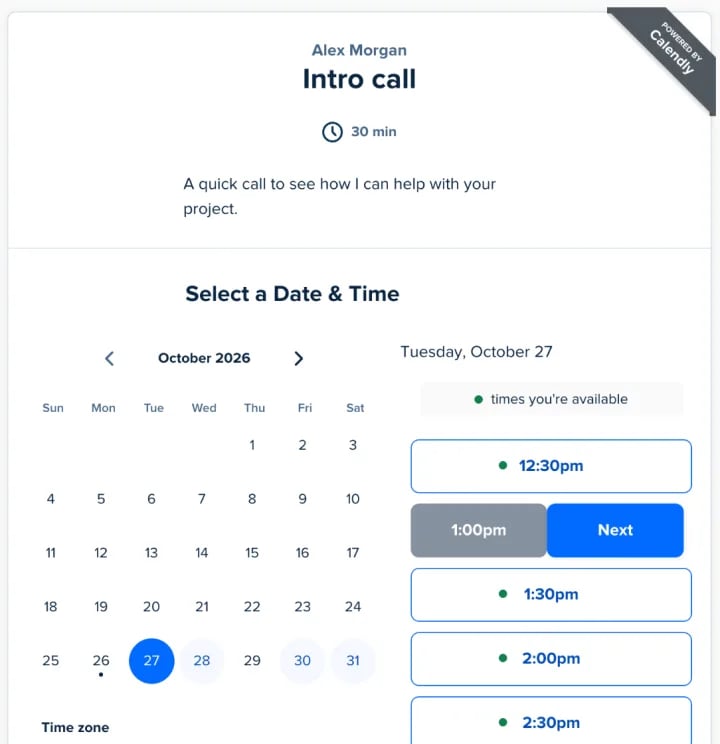
One nice touch: our test browser was signed in to Calendly, so the page marked "times you're available" with a green dot, based on our own calendar. If your guest uses Calendly too, they can see at a glance which times suit both of you.
After they pick a time, they click "Next" and fill in a short form: name, email, an option to add guests, and anything you asked for. They don't need a Calendly account.
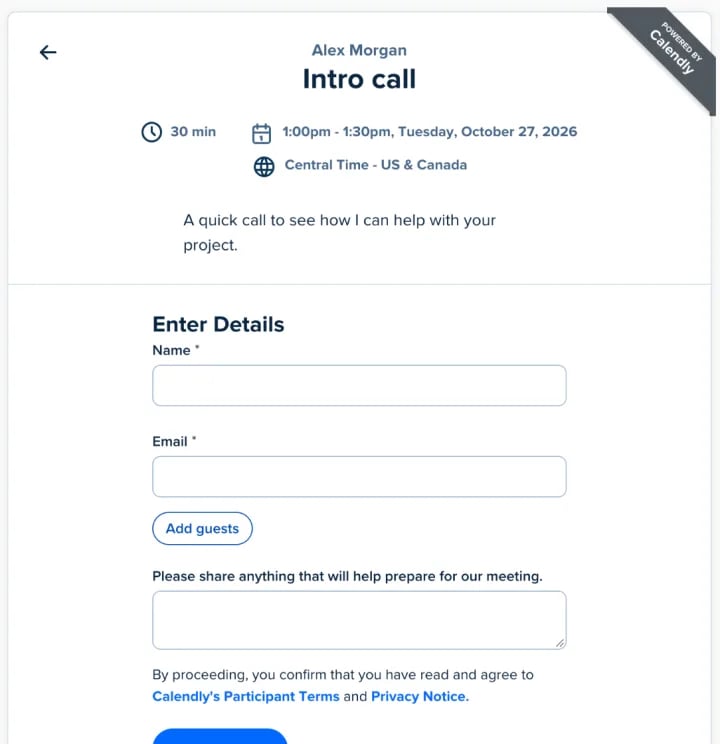
When they click "Schedule Event", the meeting goes onto your calendar and theirs. Calendly also emails you about every new booking. That email comes from Calendly itself, and you can't turn it off.
Key Calendly features
Beyond the booking link, Calendly has grown into a large app. These are the parts most people ask about:
- Meeting polls. A group votes on a few times, and you book the winner. They're included on the free plan.
- Single-use links. A link that "can only be booked once", handy for a VIP or a one-time call.
- Workflows. Reminder and follow-up emails and texts before and after a meeting. They're on paid plans only, so free users can't send automatic reminders.
- Team scheduling. Round robin shares new meetings across a team, and collective events find a time when several hosts are all free. Round robin needs the Teams plan.
- Routing forms. A short form that sends each lead to the right person's calendar, for sales teams.
- Integrations. Zoom, Google Meet, Microsoft Teams, Salesforce, HubSpot, Stripe, PayPal and many more.
- AI tools. Callie, an assistant that books meetings over email, and Notetaker, which records and sums up your calls. Both come with the "Plus" plans.
How much does Calendly cost?
Calendly has a free plan and paid plans priced per seat:
| Plan | Billed yearly | Billed monthly | What it adds |
|---|---|---|---|
| Free | $0 | $0 | 1 active event type and 1 calendar |
| Standard | $10 per seat a month | $12 per seat a month | Unlimited event types, reminders, payments |
| Teams | $16 per seat a month | $20 per seat a month | Round robin, routing, Salesforce |
| Enterprise | From $15,000 a year | Yearly only | Security and admin controls |
The Standard Plus and Teams Plus plans add the AI tools for $8 more per seat. For every limit of the free plan and what a team really pays, see Is Calendly free?
Calendly pros and cons
In our test: Calendly's guest side is excellent. The booking page is clean and familiar, and people know how to use it. The host side is another story. Our free account was crowded with AI assistants, contacts, routing forms and "Upgrade plan" buttons, all around the one thing most people came for: a link. And on the free plan, that link doesn't go far. Our second event type sat switched off with a "Turn On" button that led to the upgrade box.
What we liked:
- A booking page that guests recognize and trust.
- Time zones handled for every guest, with no setup.
- The "times you're available" dots, when your guest also uses Calendly.
- Meeting polls on the free plan.
What we didn't:
- The free plan stops at 1 active event type and 1 calendar, so you can't offer an intro call and a longer session side by side.
- No reminders without paying, which is the feature that cuts no-shows.
- Per-seat prices add up. A team of 5 on Teams pays $960 a year, billed yearly.
- A busy app for people who just want to share their free times.
A simpler free alternative: zcal
If you like how Calendly works but not its free plan, zcal is a free scheduling app built around the same idea: connect your calendar, share a link, and people book open times. The difference is what you get for free:
- Unlimited booking links and calendars, so the intro call and the paid session each get their own link.
- An email reminder before every meeting, to cut no-shows.
- Meeting polls and group events, with up to 5 people per time slot.
- A booking page that reflects your brand, with a cover photo, a welcome video and a short intro.
zcal's paid plan, Pro, starts at $7 per user a month, billed yearly, and adds text reminders, round robin and collective events. Create a free booking link, or compare zcal with other Calendly alternatives.
Frequently asked questions
Is Calendly free?
What are the disadvantages of Calendly?
Is Calendly the same as Zoom?
Does Calendly notify you when someone schedules a meeting?
Do my guests need a Calendly account?
How does Calendly work with Google Calendar?
Related Articles
There's a better way to schedule meetings
Join zcal freeWant unlimited booking links, polls and reminders for free?
Try zcal free