
SMS appointment reminders that cut no-shows
Automatic text reminders for every client who books. A quick text before each meeting means fewer no-shows and fewer wasted hours.
Try it free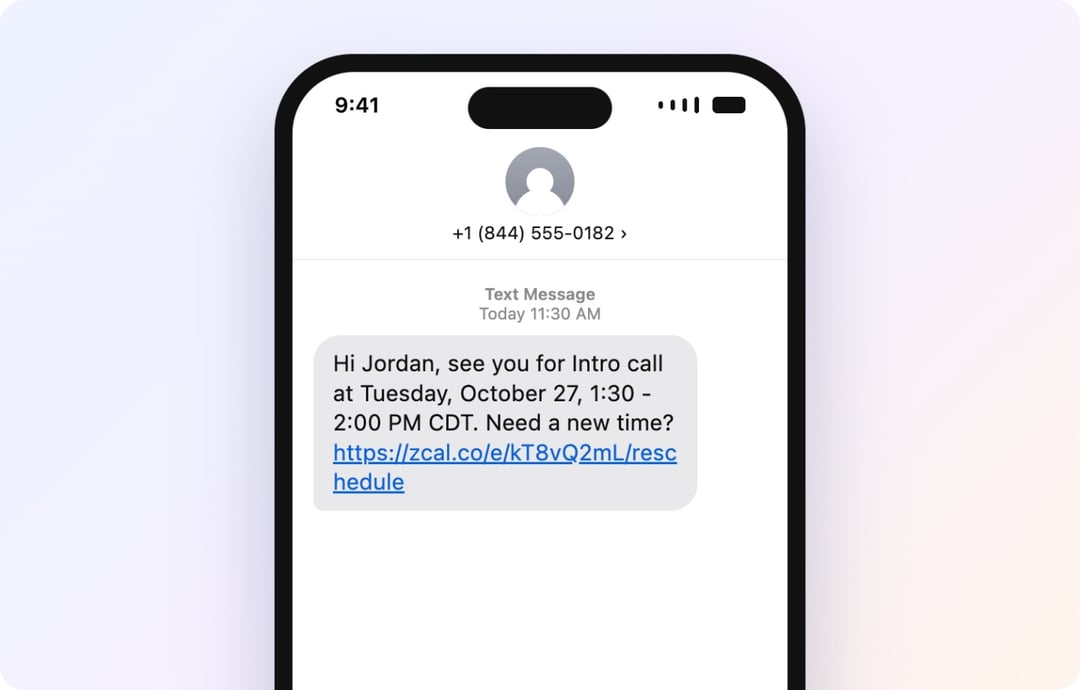
Trusted by leading brands, from fast-growing startups to large enterprises.








zcal is a scheduling app with text reminders built in, so fewer clients miss their meeting. Clients book a time on your booking page, and zcal texts each one before the meeting, at the time you choose. Set it up once, and you never send a reminder by hand again.
Table of contents
How it works
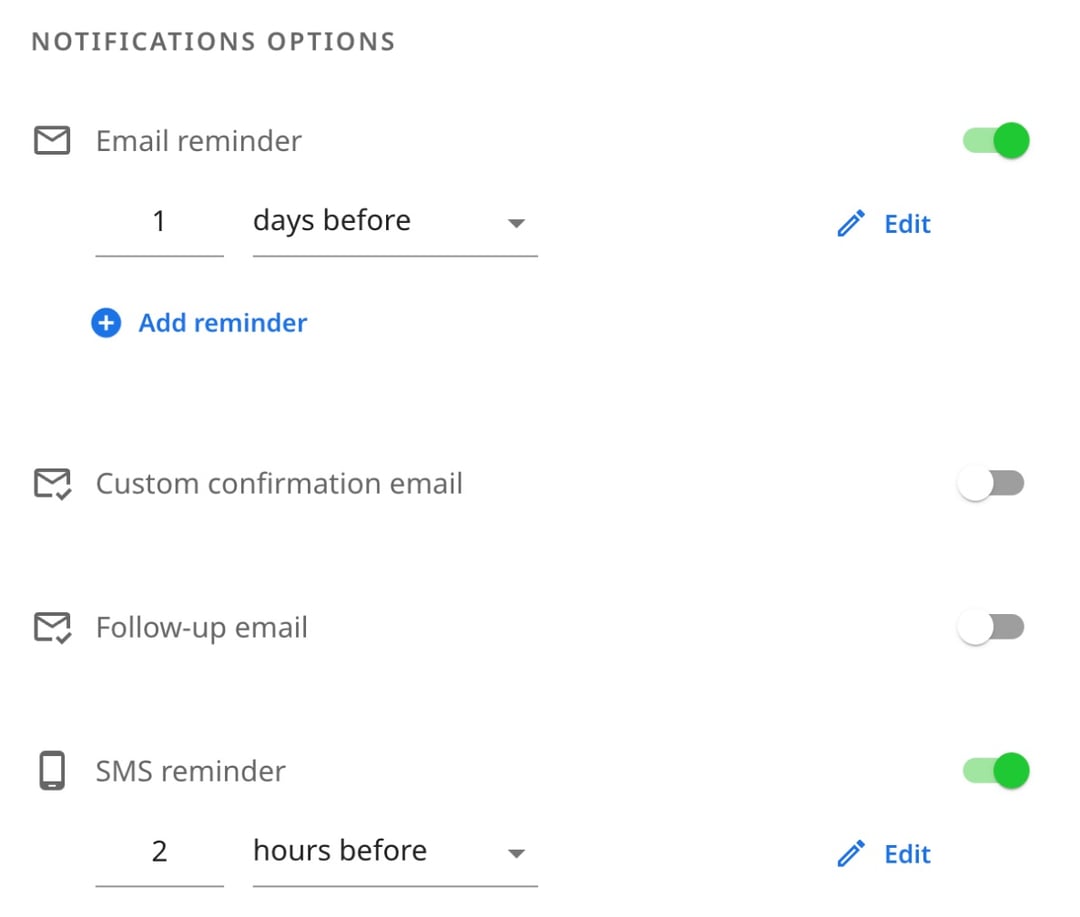
1. Turn on SMS reminders
Open the settings of the booking page your clients use, and switch on SMS reminders. Choose when the text goes out, from a few minutes to a few days before the meeting. Keep your email reminder on too, so clients hear from you twice.
2. Write your message
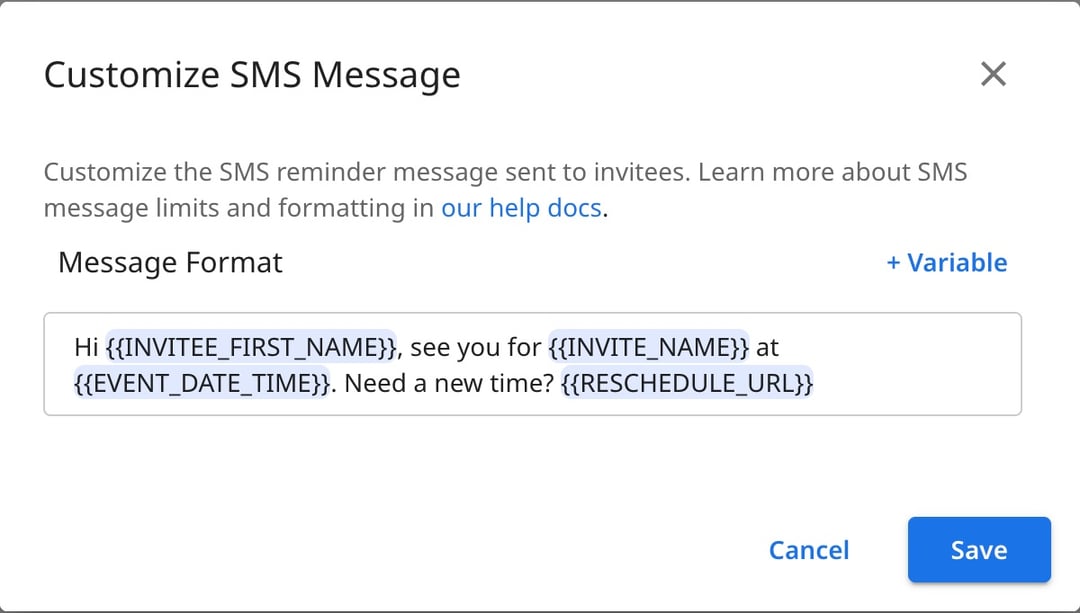
Start from the ready-made text, or write your own. Add the client's first name, the meeting time, the video link and a link to reschedule, and zcal fills them in for every booking.
3. Clients add their mobile number when they book
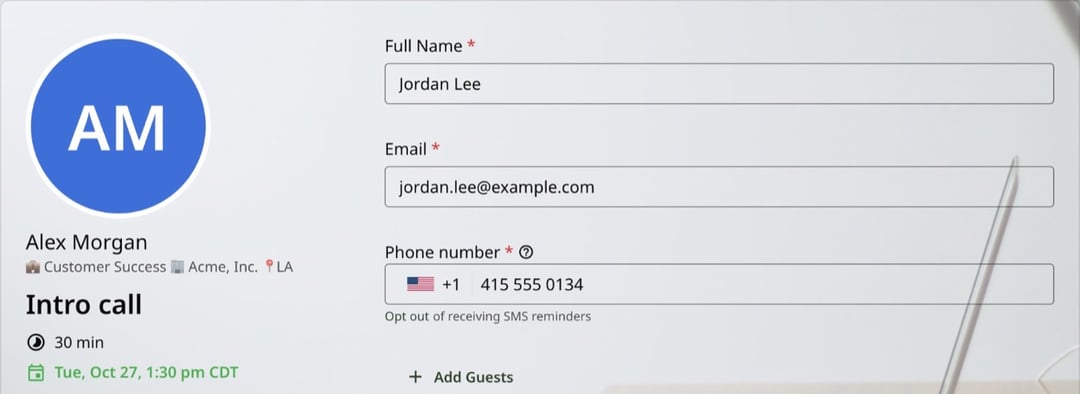
Your booking page asks for a mobile number, with a link to opt out. There's no contact list to build or upload: every new booking brings its own number.
4. The text goes out on time
zcal sends the reminder at the time you chose, with the meeting time in the client's own time zone. If they reschedule, the text follows the new time. If they cancel, no text goes out.
Why text reminders cut no-shows
Most no-shows aren't rude. People just forget. An SMS appointment reminder fixes that: a short text before the meeting with the day and time, the place or video link, and a way to reschedule.
Texts get noticed where email doesn't: on the lock screen, in the minutes before someone heads out the door or opens their laptop. In one clinic trial, text reminders cut missed visits from 38% to 24%. For anyone who sells their time, every no-show you prevent is an hour you get paid for.
Text, email or calendar invite?
Each one does a different job, and the best reminders use all three.
| Text message | Calendar invite | ||
|---|---|---|---|
| Best for | A short nudge right before the meeting | The full details, such as an agenda or prep notes | Holding the time in your client's calendar |
| Where it shows up | The phone's lock screen | The inbox | The calendar app, with its own alerts |
| Watch out for | Keep it under 160 characters | It can get lost in a busy inbox | Your client's settings decide when they get an alert |
| In zcal | Pro and Business | Every plan | Every booking, on every plan |
With zcal, you don't have to choose. Your client gets a calendar invite the moment they book, an email reminder before the meeting, and a text when it counts.
What a good reminder text says
A good reminder text is easy to read in one glance. Your client knows who it's from, what's happening and what to do. Aim for four things, in under 160 characters:
- Who it's from. Start with your name or your business name, so the text doesn't look like spam.
- What and when. The meeting, the day and the time, in your client's time zone.
- Where. The address, or the Zoom, Google Meet or Microsoft Teams link.
- What to do if plans change. A link to reschedule or cancel. A client who can't make it then picks a new time instead of not showing up.
Here are three reminder texts you can copy. In zcal, the client's name, the meeting, the date and time, the address and the links fill in on their own for every booking.
| Use it for | Reminder text |
|---|---|
| The day before | Hi [first name], it's [your name] from [business]. See you on [date and time] for your [meeting]. Need a new time? [reschedule link] |
| A video call | Reminder from [meeting] is on [date and time]. Join here: [video link] |
| An in-person visit | Hi [first name], see you on [date and time] at [address]. Can't make it? [reschedule link] |
Keep every text about the booking. Your clients gave you their number for this meeting, so save promotions for email. Before you go live, book your own event with your own number, and read the text the way your client will.
When to send a reminder text
Send it too early, and your client forgets again. Send it too late, and there's no time to plan or to reschedule. These timings work for most meetings:
| Meeting | Send the text | Why |
|---|---|---|
| Video call | 1 hour before | Time to find the link and a quiet room |
| In-person appointment | 2 to 3 hours before | Time to plan the trip, or to move the visit |
| Early-morning meeting | The evening before | A text at 7 AM can come too late |
| Class or group session | 1 day before | Time to plan the day around it |
Pair the text with an email reminder the day before. The email carries the full details, and the text is the nudge that gets read.
Why use zcal for text reminders
One text with everything they need
Add the client's name, the meeting name, the date and time, the address or video link, their answers to your booking questions, and links to reschedule or cancel. zcal fills in each detail for each booking, so every text reads like you wrote it for that client.
It moves when the meeting moves
If a client reschedules, the reminder follows the new time. If they cancel, no text goes out. You never have to fix a reminder by hand.
The right time in every time zone
zcal writes the time in your client's own time zone. A client in Denver never shows up two hours late for a call that you set up in New York.
No contact list to upload
Many text reminder apps start with a spreadsheet of names and numbers. In zcal, the list builds itself. Turn on SMS reminders, and your booking page asks each client for a mobile number. Every new booking gets its reminder, from the moment it's made.
Clients stay in control
The phone number field on your booking form comes with an opt-out link. Clients who opt out still get your email reminders, so nobody misses the meeting details.
Email reminders too
Every zcal plan sends email reminders, including the free plan. On Pro, add up to 5 email reminders to each event type and write each one yourself. Your clients then hear from you by email and by text.
Ready for teams
Text reminders work on team events too, such as round robin and collective meetings. zcal spreads the texts across your hosts' credits, so one person's credits don't run out first.
30 countries
Text clients in the US, Canada, the UK, Germany, France, Australia, India, Japan, Brazil, Mexico and more: 30 countries in all.
Who uses text reminders
Coaches and consultants
A missed session is an hour you can't bill. A text an hour before puts the video link at the top of your client's phone, right when they need it. See scheduling software for coaches.
Tutors and teachers
Students and parents have full calendars. A same-day text with the time and the link means fewer "Sorry, I forgot!" messages. See tutor scheduling with zcal.
Sales teams
A demo that doesn't happen is a lead that goes cold. A short text with the meeting link keeps your prospect on track, and a reschedule link keeps them in your pipeline if something comes up.
Recruiters
Candidates often have several interviews in one week. A text with the time, the interviewer and the link helps them show up for yours, ready to go.
Classes and group sessions
On a group event, such as a class, every person who books gets their own reminder, in their own time zone. That's one less message for you to send to the whole group.
What SMS reminders cost
Text reminders are part of zcal Pro, from $7 a month, and Business, from $12 a month. Both plans come with a 14-day free trial, and text reminders work during the trial. Email reminders are free on every plan.
Each plan includes SMS credits every month, for each user:
| Pro | Business | |
|---|---|---|
| Credits each month | 750 | 1,500 |
| Texts to the US or Canada | About 75 | About 150 |
| Texts to the UK, Australia, Brazil, Mexico and 5 more countries | About 40 | About 80 |
| Texts to the other supported countries | About 20 | About 40 |
Each 160 characters count as one text, so a longer message uses more credits. Credits reset on the 1st of each month. If you run out, texts pause until then, your email reminders keep going, and zcal sends you an email to let you know. There are no per-text charges.
For comparison, Calendly keeps text reminders for its paid plans, from $10 a month, and doesn't allow them during its free trial.
More ways to cut no-shows
- Meeting reminder messages. How to write reminder emails and texts that people answer.
- Appointment reminder templates. Ready-to-copy reminders for every kind of appointment.
- Booking links. Let clients book a time that works, so fewer of them need to reschedule.
- Meeting polls. Find a time that works for a whole group before you book it.
Want the step-by-step setup? See SMS reminders in the zcal help center.
Frequently asked questions
How do I send automatic text reminders to clients?
Turn on SMS reminders on the event type your clients book, choose when the text goes out, and save. zcal adds a phone number field to your booking page and texts each client before their meeting. You never send a reminder by hand.
Can I send text reminders for free?
Email reminders are free on every zcal plan. Text reminders are part of Pro, from $7 a month, which covers about 75 texts a month to the US and Canada. Pro comes with a 14-day free trial, and text reminders work during the trial.
How many text reminders can I send each month?
Pro includes 750 SMS credits for each user each month, and Business includes 1,500. A text to the US or Canada uses 10 credits, so Pro covers about 75 texts a month. Texts to other countries use more credits. Credits reset on the 1st of each month.
How far in advance should I send a reminder text?
For most meetings, 1 to 2 hours before. That's close enough to stick and early enough to reschedule. For an early-morning meeting, send it the evening before, and pair the text with an email reminder the day before.
Can clients reschedule or cancel from the text?
Yes. Add the reschedule or cancel link to your message, and clients can pick a new time on your booking page, or cancel, with one tap. No phone call, no back-and-forth.
Can clients stop getting text reminders?
Yes. The phone number field on your booking form has an opt-out link, and a client who opts out can opt back in later. Clients who opt out still get your email reminders.
Can Google Calendar send text reminders?
No. Google Calendar stopped sending SMS notifications in January 2019. It now reminds people by email and app notifications only. To text your clients, connect Google Calendar to zcal: bookings land in your calendar as usual, and zcal sends the texts.
Which countries can receive text reminders?
30 countries, including the US, Canada, the UK, Australia, Ireland, Germany, France, Spain, Italy, the Netherlands, India, Japan, Singapore, Brazil and Mexico. Texts to the US and Canada use the fewest credits.
Do I need my clients' permission to text them?
You should always have it, and in many places the law requires it. In zcal, clients type their own mobile number into your booking form, right next to a link to opt out, and the texts are only reminders for the meeting they booked.
