
Free scheduling software for coaches
Coaching sessions that book and pay for themselves. Clients pick a time, pay up front and get a reminder before you meet.
Create your coaching link free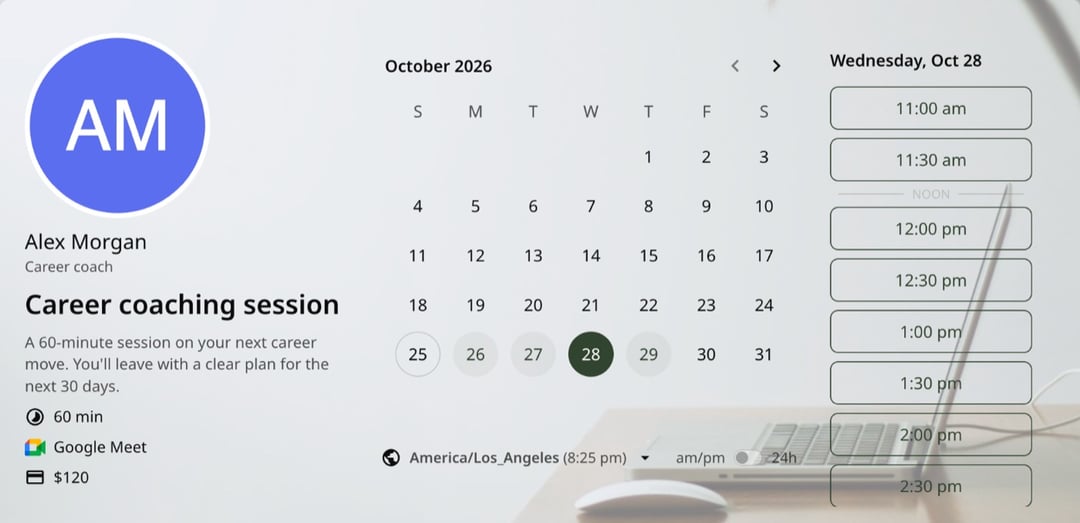
Trusted by leading brands, from fast-growing startups to large enterprises.








zcal is a free scheduling app, and its booking links work as coaching scheduling software for life, career, business and health coaches. Make one link for discovery calls and another for paid sessions, add a few intake questions, and share them. Clients book in their own time zone, pay when they book and get a calendar invite with the video link. You start every session knowing what they want to work on.
Table of contents
How it works
1. Create your session types
Make a free 20-minute discovery call and a paid 60-minute session, each with its own link. Links are unlimited on the free plan, so add one for every program you run.
2. Set your price
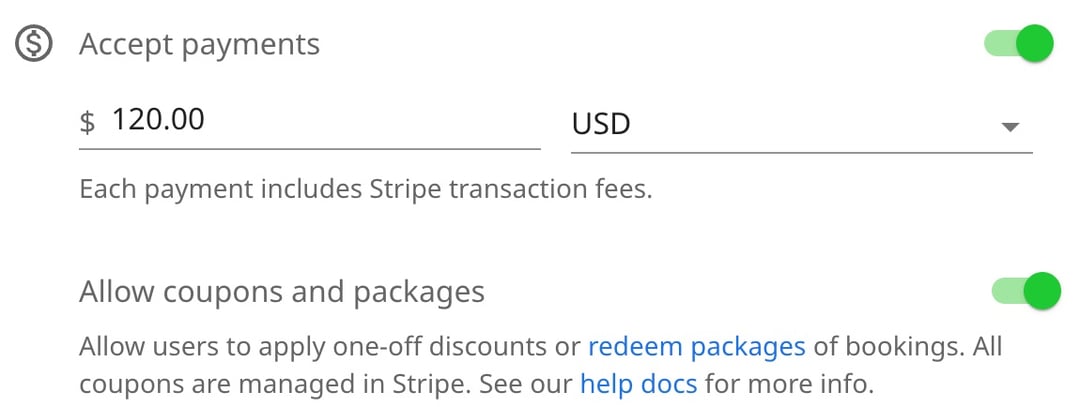
Turn on payments and set a price, and clients pay by card through Stripe when they book. On Pro, turn on coupons and packages to sell a block of sessions.
3. Ask what they want to work on
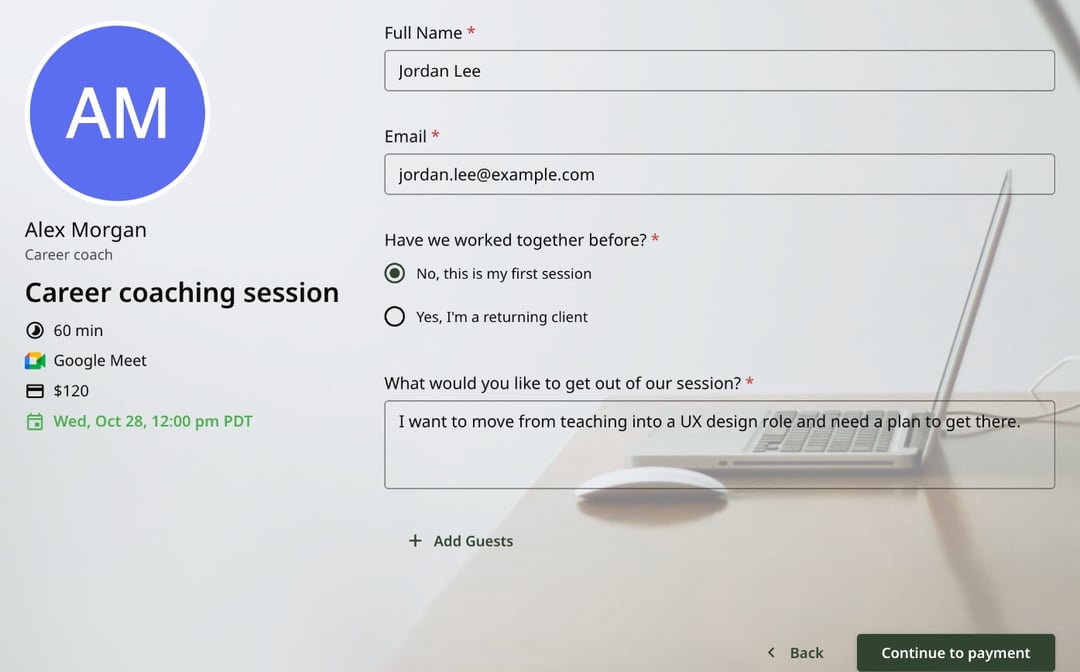
Add intake questions, such as whether they're a new client and what they want from the session. Clients answer before they pay, so you can plan the session ahead.
4. Share your link
Put it on your website, in your email signature and in your social bio. Clients pick a time in their own time zone and get a calendar invite with the video link.
Coaching you can schedule with zcal
Life coaching
Discovery calls, weekly sessions and check-ins. Clients book the next session from the same link, at a time that fits their week.
Career coaching
Resume reviews, interview prep and career change plans. Ask about the role they want when they book, so you can come with ideas.
Business and executive coaching
Leaders have full calendars. zcal only shows the times you're both free, and the invite lands on their work calendar with the video link.
Health, fitness and nutrition coaching
Check-ins and plan reviews, online or in person. Ask about goals and health conditions on the booking form, before the first session.
Group coaching
Run a cohort call or a workshop from a group link with a seat limit. Everyone gets the same invite and the same video link.
Coaching teams
Share new clients across your coaches with round robin, or co-coach a session with a partner using collective events.
Why coaches use zcal
A discovery call that turns into a client
A free 15 or 20-minute discovery call is often the first step to a paid client. It's easy to say yes to, and when you're a good fit, you point them to your paid session link.
Paid sessions and packages
Charge for each session up front through Stripe, so you never chase an invoice. On Pro, sell a package of sessions with a promo code that covers a set number of bookings.
Clients who show up
Every client gets a calendar invite and an email reminder before you meet. On Pro, add text reminders too. Clients who need to move a session reschedule from their invite, without a message to you.
Know their goals before you meet
Ask what they want to work on, how they heard about you, or anything else you need. On Pro, clients can upload a worksheet or a resume before the session.
Clients anywhere in the world
Clients see your hours in their own time zone, so nobody shows up an hour early. Online sessions get a Zoom, Google Meet or Microsoft Teams link automatically.
A page that reflects your brand
Add your photo, a cover image and a short welcome video, so new clients get a feel for you before the first call. On Pro, remove the zcal branding.
Follow-ups that keep the momentum
On Pro, zcal sends a follow-up email after each session, for example with your notes or a link to book the next one.
Is zcal right for your coaching business?
It depends on what you need beyond booking.
- Solo coaches: yes. Booking pages, payments, intake questions and reminders are free, with unlimited links. Pro, from $7 a month, adds packages, text reminders and follow-up emails.
- Coaching teams: yes. Round robin and collective events on Pro and Business share clients and co-coached sessions across your team.
- Coaches who want an all-in-one platform: probably not. If you need contracts, invoices, course hosting and a client portal in one place, a full coaching platform fits better, and it costs more each month.
Tips for a fuller coaching calendar
- Name each link by its result. "Career change plan: 60 minutes" sells better than "Coaching session".
- Ask one question that starts the session. "What would make this session a win for you?" saves the first 10 minutes.
- Leave time for notes. Add a 15-minute buffer after each session to write your notes before the next client.
- Put your link at the end of everything. Your newsletter, your podcast notes and your social posts.
More ways to schedule
- Booking pages. The free booking link behind every coaching session.
- Collective events. One session with two or more coaches.
- Round robin. Share new clients across your coaching team.
- Text reminders. Text clients before each session, so fewer of them miss it.
Frequently asked questions
What is coaching scheduling software?
Coaching scheduling software lets clients book sessions with you online, at the times you're free, instead of trading emails. It checks your calendar, takes payment, asks your intake questions and sends the reminders. zcal does all of this from one free booking link.
Is there free scheduling software for coaches?
Yes. zcal's free plan gives you unlimited booking links, intake questions, email reminders, video links and Stripe payments. Pro, from $7 a month, adds text reminders, coupons and packages, file uploads and follow-up emails.
What is the best scheduling app for coaches?
The best app is one that books, takes payment and reminds clients without extra tools. zcal does all three on its free plan, and its booking pages carry your photo, cover image and welcome video. If you also need contracts, invoices and course hosting, you'll want a full coaching platform, which costs more each month.
Can clients pay when they book?
Yes. Connect Stripe, set a price for the session, and clients pay by card before the booking is confirmed. Free sessions, such as discovery calls, skip the payment step.
Can I sell coaching packages?
Yes, on Pro. Create a promo code in Stripe that covers the full price and set how many times it can be used. A client who buys a package of 6 sessions uses the code each time they book.
Can I run group coaching sessions?
Yes. A group link lets several clients book the same session, up to the number of seats you set. The free plan allows up to 5 people per session, and Pro removes the limit.
Does zcal handle clients in different time zones?
Yes. Clients see your hours in their own time zone, and the calendar invite shows the right time for each person. Every online session gets a Zoom, Google Meet or Microsoft Teams link.
Does zcal work for a team of coaches?
Yes. On Pro and Business, round robin sends each new client to a coach who's free, and collective events book a session with two coaches at once. Each coach connects their own calendar.
Can I add booking to my coaching website?
Yes. Embed your booking page on your website, so clients book without leaving it. Embedding is free on every plan.
