
Free tutoring scheduling software for private tutors
Tutor scheduling without the back-and-forth texts. Students and parents book a lesson from one link, and reminders make sure they show up.
Create your tutoring link free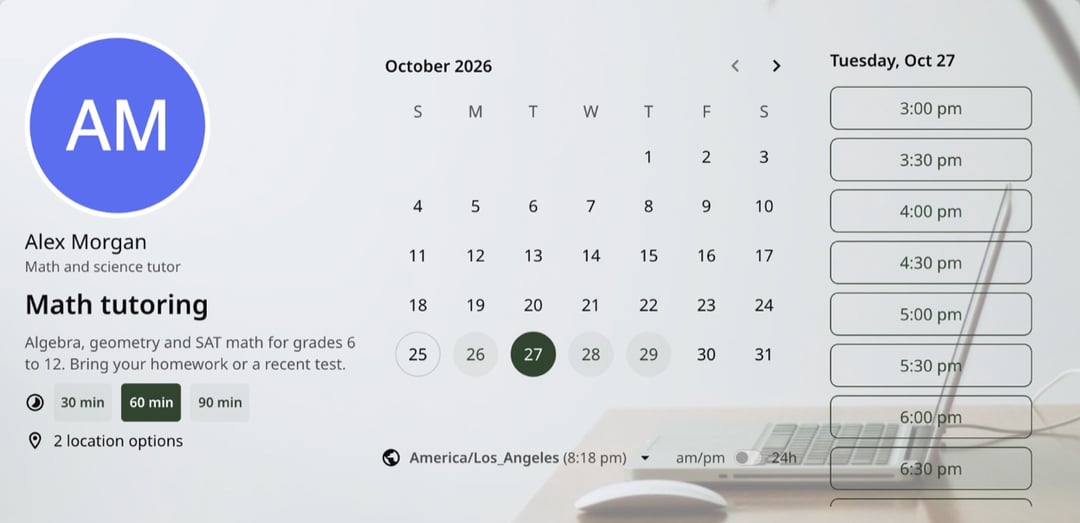
Trusted by leading brands, from fast-growing startups to large enterprises.








zcal is a free scheduling app, and its booking links work as tutoring software for private tutors and small tutoring centers. Set the hours you teach, choose your lesson lengths, and share one link. Students, or their parents, pick a time, tell you what they need help with and get a calendar invite with the video link. You spend your evenings teaching, not texting about Tuesday at 4.
Table of contents
How it works
1. Set up your lessons
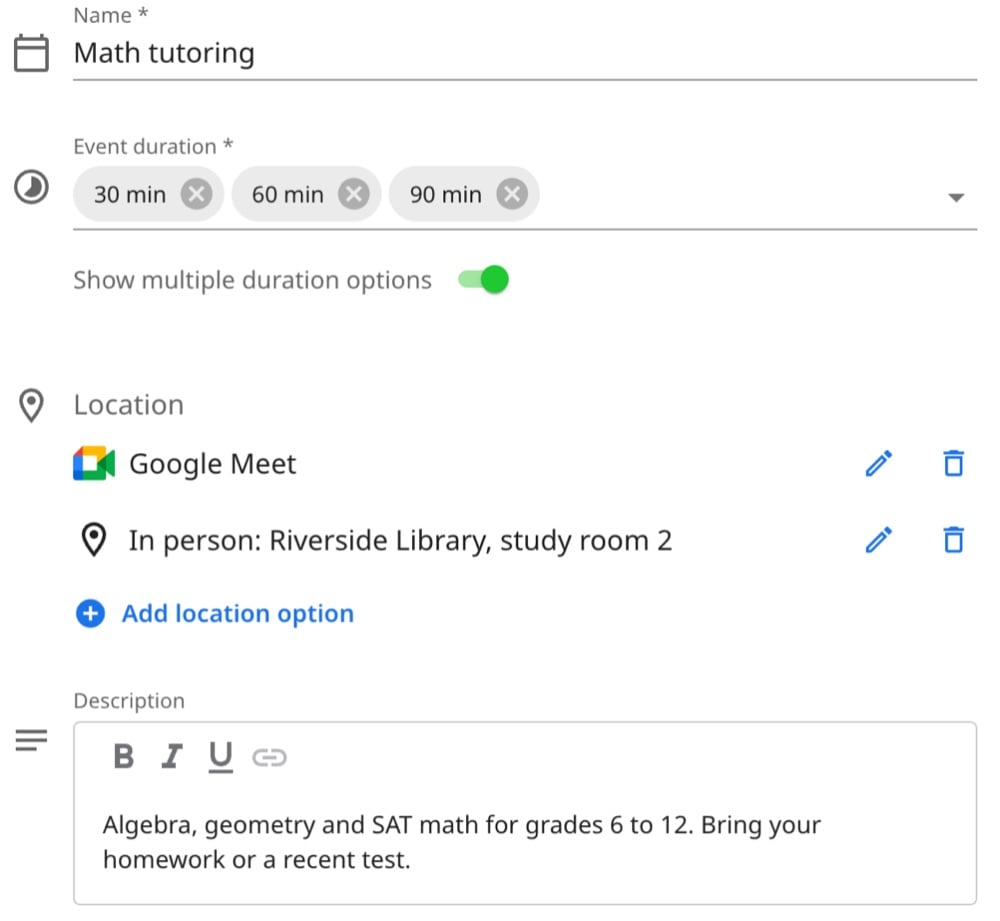
Name your lesson and pick the lengths students can choose, such as 30, 60 or 90 minutes. Then say where it happens: online, in person, or both, and let the student pick. Add a line about what to bring.
2. Choose your teaching hours
Set the hours you tutor, such as 3 to 8 pm on weekdays, and add a short break after each lesson. zcal checks your Google, Outlook or Apple calendar, so nobody books a lesson on top of your own plans.
3. Students book and tell you what they need
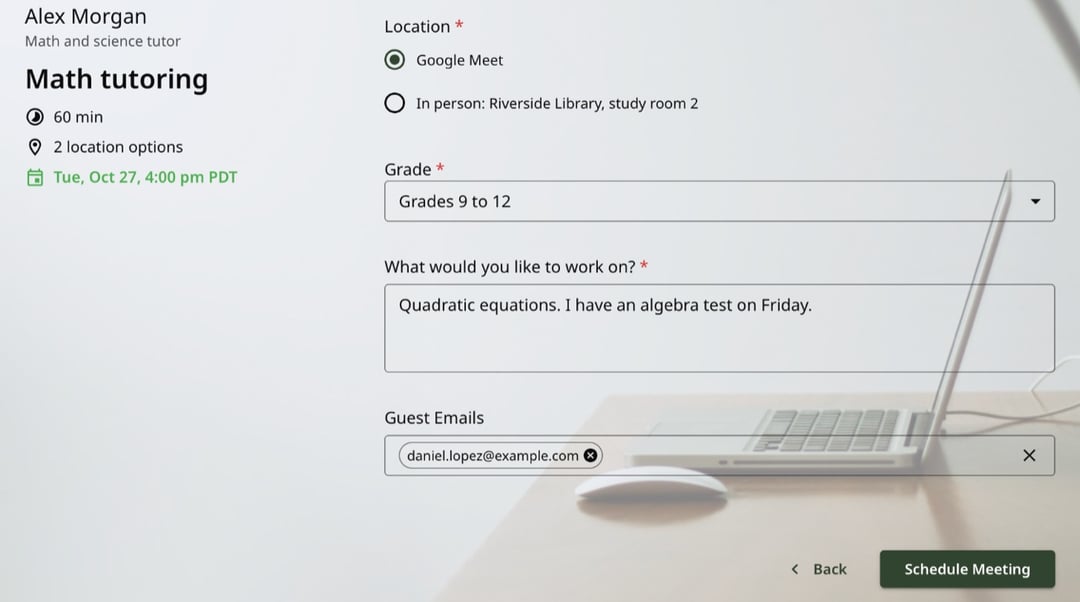
Students pick a time, then answer your questions, such as their grade and the topic. A parent can add their email, so they get the invite and the reminders too.
Tutoring you can schedule with zcal
Private 1-on-1 lessons
Math, science, reading, writing: any subject, any level. Every lesson is a booking on your calendar, with the student's questions and the video link in one place.
Online tutoring
Teach students in another city or another country. They see your hours in their own time zone, and every booking comes with a Zoom, Google Meet or Microsoft Teams link.
Test prep
SAT, ACT, AP and final exams. Offer 90-minute sessions for deep review, and open extra hours on the dates before a big test.
Music and language lessons
Weekly piano, guitar or Spanish lessons. Students pick the length that suits them, and they always see your newest hours.
Study groups
Run a small group session with a seat limit, the same way as a class, so students share the cost of a lesson.
Tutoring centers
Give each tutor their own link, or let students book whichever tutor is free with round robin.
Why tutors use zcal
No more back-and-forth
Share one link instead of trading texts about times. Students book at any hour, and you see the lesson on your calendar right away.
Parents stay in the loop
Parents can add their email when their child books, so they get the invite, the reminders and any change to the time. You don't have to forward a thing.
Fewer missed lessons
Every student gets an email reminder before the lesson. On Pro, add text reminders too, so the reminder lands on the phone in their pocket.
Get paid when they book
Connect Stripe and charge for each lesson up front, so you stop chasing payments. On Pro, sell lesson packages, such as 10 lessons, with a promo code.
Come to every lesson prepared
Ask for the grade, the topic and the next test date when students book. On Pro, students can upload their homework or a past test before the lesson.
Breaks between lessons
Add a buffer after each lesson to write notes or travel to the next student. You can also limit how many lessons people can book in a day or a week.
Follow up after each lesson
On Pro, zcal can send a follow-up email after every lesson, for example with the homework or a link to book the next one.
Is zcal right for your tutoring business?
It depends on how you work.
- Private tutors: yes. Your 1-on-1 lessons, reminders and payments are free, with no limit on bookings. Pro, from $7 a month, adds text reminders, lesson packages and file uploads.
- Small tutoring centers: yes. Each tutor gets their own link and calendar, and round robin on Pro shares new students across your team.
- Large centers: probably not. If you need automatic invoicing, tutor payroll and progress reports for parents, you need full tutoring management software, which costs more each month.
Tips for a fuller tutoring schedule
- Offer a short first session. A free 20-minute intro link lets a new student meet you before they pay for a full lesson.
- Ask one useful question. "What would you like to work on?" turns the first 10 minutes of each lesson into teaching time.
- Open extra hours before exams. Add date-specific hours in the weeks before finals, when students need you most.
- Put your link everywhere students find you. Your website, your email signature and your tutoring profiles.
More ways to schedule
- Booking pages. The free booking link behind every tutoring lesson.
- Class scheduling. Group lessons and workshops with a seat limit.
- Text reminders. Text students before each lesson, so fewer of them miss it.
- Round robin. Share new students across the tutors on your team.
Frequently asked questions
What is tutor scheduling software?
Tutor scheduling software lets students and parents book lessons online at the times you teach, instead of messaging you. It checks your calendar, sends the reminders and adds the video link. zcal does all of this for free, and students don't need an account.
Is there free tutor scheduling software?
Yes. On zcal's free plan, you can take as many 1-on-1 lessons as you like, with booking questions, email reminders, Stripe payments and video links. Pro, from $7 a month, adds text reminders, lesson packages and file uploads.
Can parents book lessons for their children?
Yes. A parent can book with their own name and add the student's email as a guest, or the student can book and add a parent. Everyone gets the calendar invite and the reminders.
Can I take payment before the lesson?
Yes. Connect Stripe, set a price for the lesson, and students pay when they book. On Pro, you can also sell lesson packages: a promo code that covers a set number of lessons.
Can students choose how long their lesson is?
Yes. Offer several lengths on one link, such as 30, 60 and 90 minutes. Students pick a length first, and zcal only shows the times that fit.
Can I tutor students in other time zones?
Yes. Students see your hours in their own time zone, and the invite shows the right time for each person. Online lessons get a Zoom, Google Meet or Microsoft Teams link automatically.
How do cancellations and rescheduling work?
Students cancel or reschedule from their calendar invite, and the time opens up again. Set a minimum notice to stop last-minute changes, or hide the cancel and reschedule links if you want students to message you instead.
Does zcal work for a tutoring center with several tutors?
Yes. Each tutor can have their own link, or, on Pro and Business, students can book whichever tutor is free with round robin. Each tutor connects their own calendar.
