
Round Robin Scheduling: What It Is and How It Works
Published October 26, 2026

At a glance
Round robin scheduling shares meetings across a team in turn. Clients book through one team link, and each new meeting goes to the next team member who is free at that time. Everyone gets a fair share, clients see more open times, and nobody has to hand out meetings by hand.
If your team shares one inbox of demo requests, support calls or interviews, you've seen the problem: one person gets buried while another sits idle, and someone wastes time deciding who's next. Round robin scheduling fixes that. This guide explains how it works, the different ways a tool can pick the next person, when to use it, and how to set it up.
Searching for something else? In computing, round robin is a way to share processor time, where each task gets an equal time slice in turn. And a "round robin meeting" can also mean a discussion where each person speaks in turn. We cover that at the end. This guide is about meetings with clients.
Table of contents
What is round robin scheduling?
Round robin scheduling is a way to share bookings across a group of people, one after another. You share one link for the whole team. A client picks any time that someone on the team is free, and the meeting goes to the person whose turn it is.
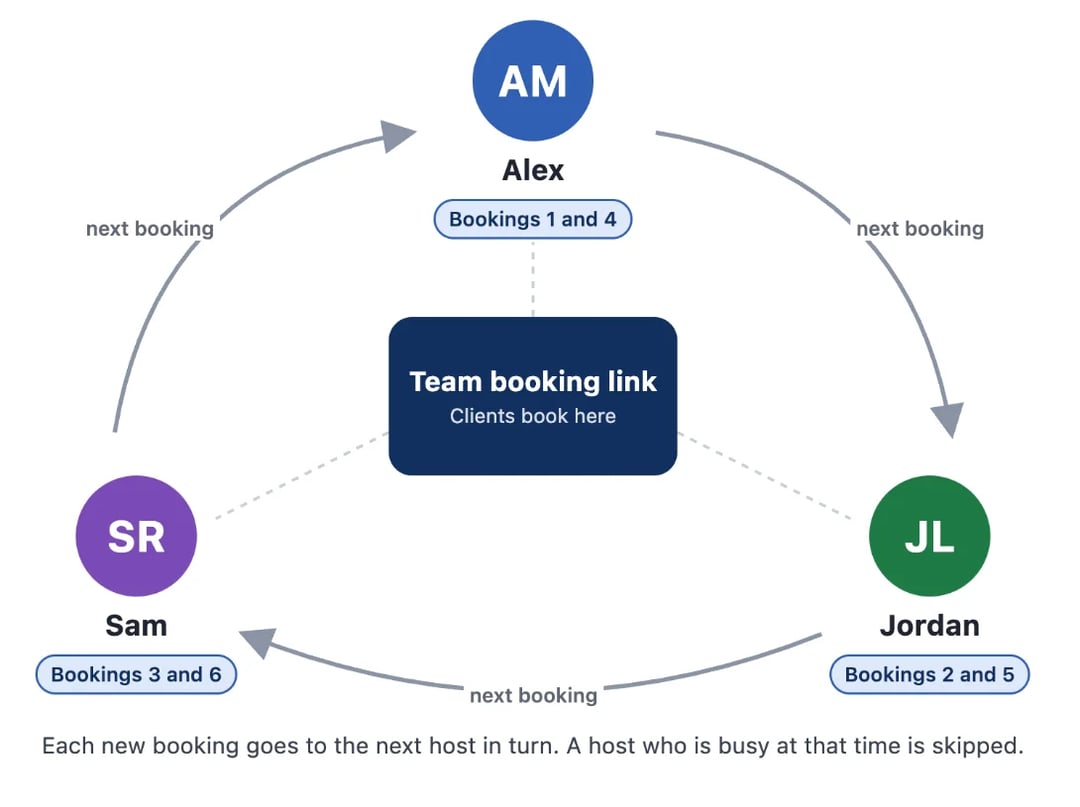
Teams use it for:
- Sales demos: every lead lands with a rep who is free, fast.
- Support and onboarding calls: no one person carries the whole load.
- First-round interviews: candidates book any open slot across the recruiting team.
- Agencies and clinics: clients book "a consultant" or "a provider", not one person.
How round robin picks the next person
Not every tool takes turns in the same way. These are the 4 common methods:
| Method | How it picks the host | Best for | Watch out for |
|---|---|---|---|
| Strict rotation | Always the next person in a fixed order | Very even teams | If that person is busy, the client gets fewer times, or the turn is lost |
| Equal distribution | Whoever has had the fewest meetings | Keeping the count even over a month | A new teammate may get many meetings in a row to catch up |
| Availability first | Whoever is free, with no turn order | Booking clients as fast as possible | The most-free person gets the most meetings |
| Priority or weighted | Some hosts get meetings first, or more often | Senior closers, or new hires who ramp up slowly | Too many high priorities, and it's not round robin any more |
Most teams want a mix: take turns, skip anyone who's busy, and let a manager give some people priority. That's how zcal does it.
A worked example
Here's how zcal shares the first 6 bookings on a new team link with 3 hosts. All 3 have the same priority, and Alex is first on the host list.
| Booking | Free at that time | Who gets it | Why |
|---|---|---|---|
| 1st | Alex, Jordan, Sam | Alex | Nobody has a booking yet, and Alex is first on the list |
| 2nd | Alex, Jordan, Sam | Jordan | Jordan and Sam have no bookings yet, and Jordan is next on the list |
| 3rd | Alex, Jordan, Sam | Sam | Sam is the only host with no booking |
| 4th | Alex, Jordan, Sam | Alex | Alex's last booking is the oldest |
| 5th | Alex and Sam (Jordan is busy) | Sam | Jordan is skipped, and Sam was booked longer ago than Alex |
| 6th | Alex, Jordan, Sam | Jordan | Jordan's last booking, the 2nd, is now the oldest |
Two more rules matter in real life:
- A cancelled booking doesn't count. If a client cancels, that host moves back up the line.
- A reschedule stays with the same host. The client picks a new time from that host's calendar, so nobody has to repeat the intro.
Round robin vs collective vs one-on-one
| Type | Hosts in each meeting | What the client sees | Use it for |
|---|---|---|---|
| One-on-one | 1, always the same person | That person's free times | Your own meetings |
| Round robin | 1, from the team | Every time that any host is free | Sales demos, support calls, first interviews |
| Collective | All the hosts you pick | Only times when every host is free | Panel interviews, kickoff calls |
Round robin gives clients the most open times, because only one host needs to be free. Collective gives them the fewest, because everyone does.
Pros and cons of round robin scheduling
Pros:
- Fair by default. Meetings spread out without anyone keeping count.
- More times for clients. A client sees every slot where anyone is free, so they book faster.
- Faster replies to leads. A new lead books a rep right away, instead of waiting for someone to assign them.
- Fewer double bookings. A good tool checks every host's calendar and skips anyone who's busy.
Cons:
- Clients can't pick the person. If a client wants a specific rep, share that rep's own booking link instead.
- Not every meeting is equal. One host's 5 meetings may all be big deals while another's are all small. Watch the results, not only the count.
- It needs every calendar connected. If a host's calendar is missing, they'll get meetings they can't make.
Our take: if 2 or more people take the same kind of meeting, use round robin. Handing out meetings by hand is slow, and it always feels unfair to someone.
How to set up round robin scheduling in zcal
Doing this by hand means a spreadsheet of who's next and a lot of "can you take this one?" messages. zcal, a free scheduling app, does it for you on a round robin link:
- Create a team and invite your hosts. Each person connects their own Google, Outlook or Apple calendar, so zcal knows when they're busy.
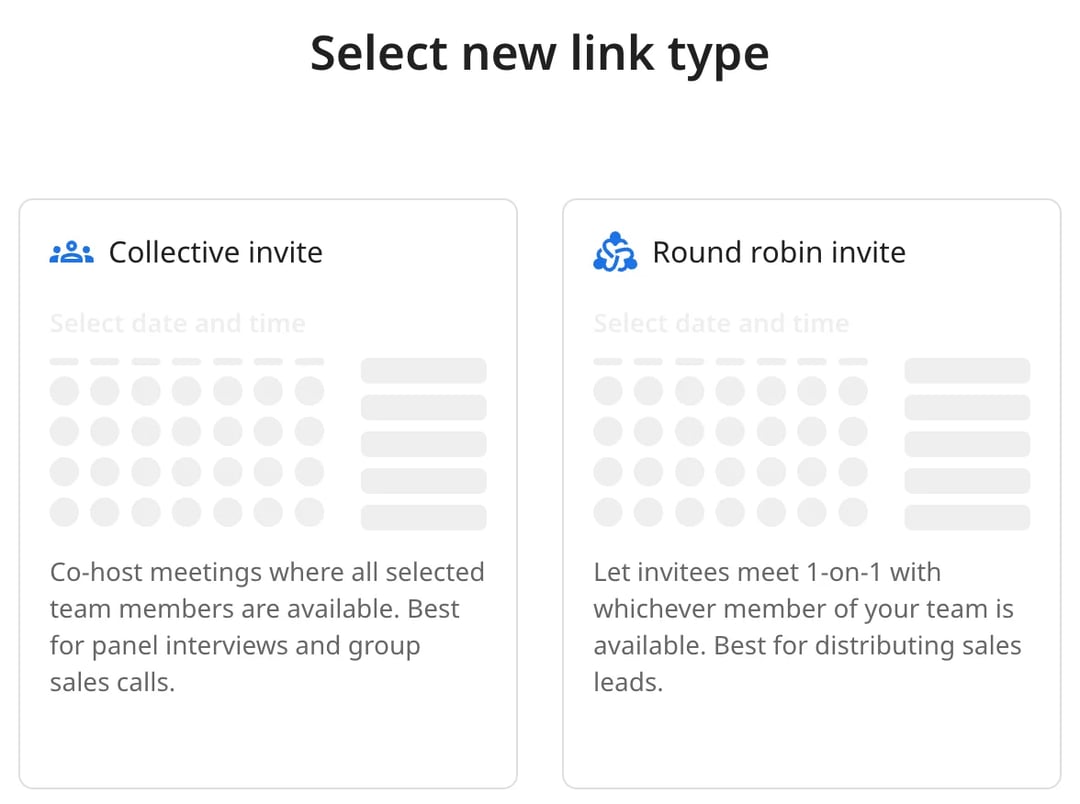
- Click New Link, pick your team, then choose "Round robin invite".
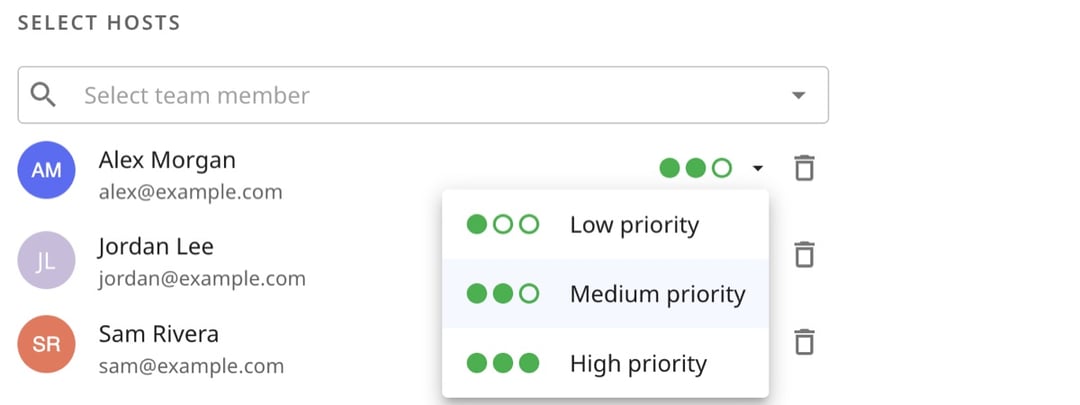
- Pick the hosts and their priority. Give each person low, medium or high priority. High-priority hosts get every meeting they're free for, and everyone else shares the rest.
- Set the length, hours and location. Choose each host's own video app, so every meeting gets a Zoom, Google Meet or Microsoft Teams link from the person who takes it.
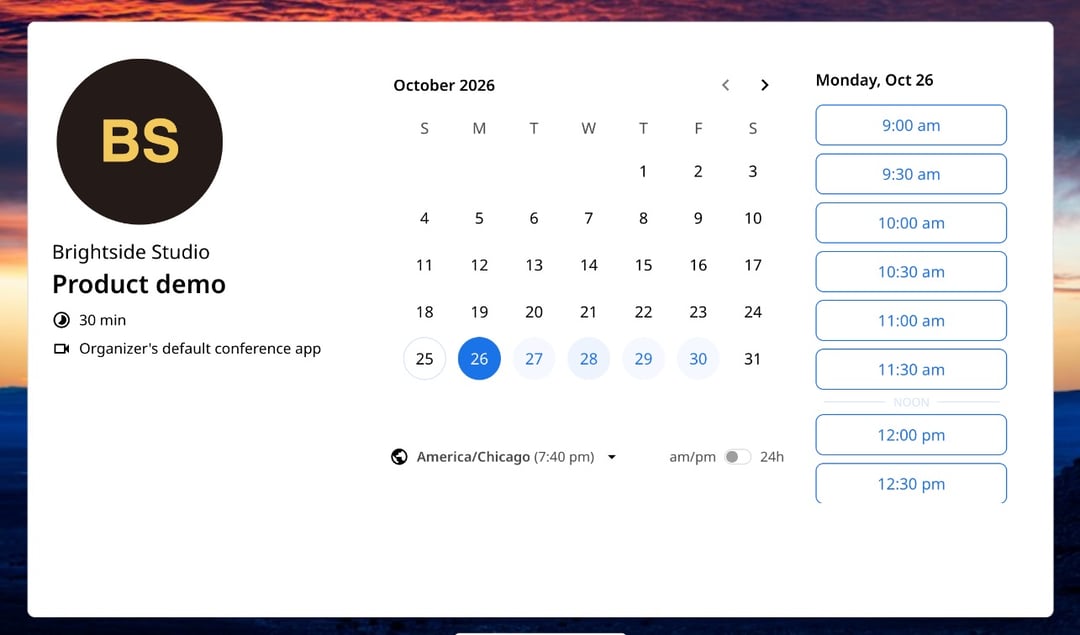
- Share the link. Put it on your website, in emails or in your sales follow-ups. Clients see one page with every open time.
Round robin is part of zcal Pro, from $7 per user a month, and Business, from $12. Both come with a 14-day free trial. See how it works on the round robin scheduling page.
Tips for round robin that runs itself
- Keep every calendar connected. Round robin is only as good as the calendars behind it.
- Use priority sparingly. One or two high-priority hosts is plenty. If everyone is high priority, nobody is.
- Add a buffer. A 10 to 15 minute gap gives each host time to write notes before the next call.
- Make one link for each meeting length. A 30-minute demo and a 60-minute deep dive work better as 2 links than as one.
- Check the numbers each month. Look at who got which meetings, and change priorities if one person is falling behind.
Round robin meetings where everyone speaks in turn
"Round robin meeting" has a second meaning: a discussion where each person speaks in turn, so every voice gets heard. It's popular for team updates, brainstorms and retrospectives.
To run one:
- Set one question or topic, such as "What's blocking you this week?"
- Set an order before you start, such as alphabetical or around the table.
- Give each person the same time, for example 2 minutes, and use a timer.
- No interruptions. Others write down questions and ask them after the round.
- Close the loop. Read back the main points and agree on next steps.
Frequently asked questions
What is round robin scheduling?
What is a round robin meeting?
Is round robin scheduling fair?
Can clients choose who they meet with?
What happens when a client reschedules?
What is the 40/20/40 rule for meetings?
Related Articles
There's a better way to schedule meetings
Join zcal freeWant unlimited booking links, polls and reminders for free?
Try zcal free