
Meeting Invitation Email: 15 Templates and Samples to Copy
Published October 26, 2026

At a glance
A good meeting invitation email says what the meeting is for, when and where it is, who's coming and what to prepare, and asks people to confirm. Put the meeting name and the date in the subject line. Below are 15 meeting invitation templates you can copy, with a short chat version for the ones you'd send on Slack or Teams.
Most meeting invitations fail in the first line. "Quick sync?" with no time, no agenda and no link gets ignored, declined or accepted by people who then show up with no idea why they're there. A clear invitation does the opposite: people know why it matters, they come prepared, and the meeting ends on time.
The templates below cover the meetings you send most often, from a quick team check-in to a formal meeting with a client. Each one has a subject line and a note on when to use it. Click Copy, swap the [brackets] for your details, and send. After the templates, you'll find what to put in an invitation, and a faster way to find a time that works for everyone. Hiring? See our interview invitation email templates.
Table of contents
Meeting invitation email templates
1. Simple meeting invitation
Use it for any meeting when you need a short, clear invite.
Subject: Invitation: [meeting name] on [day], [date] at [time]
Hi [first name],

I'd like to invite you to a [length] meeting about [topic].

When: [day], [date] at [time] [time zone]
Where: [video link or room]

The goal is to [one-sentence goal]. Please let me know if you can make it, or if another time works better.

Thanks,
[your name]
Hi [first name], can you join a [length] meeting about [topic] on [day] at [time]? Goal: [one-line goal]. I'll send the invite once you confirm.
2. Formal meeting invitation
Use it for meetings with senior leaders, partners, or anyone outside your company you don't know well.
Subject: Meeting invitation: [topic], [date]
Dear [title] [last name],

I am writing to invite you to a meeting on [topic], to be held on [day], [date] from [start time] to [end time] [time zone].

Location: [address or video link]

Agenda:
1. [agenda item]
2. [agenda item]
3. [agenda item]

Your input on [specific topic] would be very valuable. Please let me know by [RSVP date] whether you are able to attend. If this time is not convenient, I would be glad to find another.

Kind regards,
[your name]
[your title], [company]
3. Team meeting
Use it for a regular or one-off meeting with your own team.
Subject: Team meeting: [topic] on [day] at [time]
Hi team,

Let's meet on [day] at [time] for [length] to [goal].

Where: [video link or room]

Agenda:
1. [agenda item] ([name])
2. [agenda item] ([name])
3. Open questions

Before we meet, please [what to prepare, for example: add your updates to the shared doc]. If you can't make it, let me know, and send your update in writing.

Thanks,
[your name]
Team meeting [day] at [time] ([length]) to [goal]. Please add your updates to the doc before we meet: [doc link]. Invite coming!
4. Kick-off meeting
Use it to start a new project with everyone who will work on it.
Subject: Kick-off: [project name] on [day], [date]
Hi everyone,

We're starting [project name], and I'd like to bring the whole team together for a kick-off.

When: [day], [date] at [time] [time zone] ([length])
Where: [video link or room]

We'll cover:
1. Goals and what success looks like
2. Who owns each part
3. The timeline and the first milestones
4. How we'll work together and share updates

Please read the project brief before we meet: [brief link]. Come with questions. This is the best time to raise them.

Looking forward to it,
[your name]
Kick-off for [project name] is [day] at [time]! Please read the brief first: [brief link]. Bring your questions.
5. Client meeting
Use it to invite a client to a meeting about their work or their account.
Subject: Meeting to review [topic]: [day] at [time]
Hi [first name],

I'd like to set up a meeting to [goal, for example: review the first draft and agree on next steps].

When: [day], [date] at [time] [time zone] ([length])
Where: [video link or address]
Who's joining from our side: [names and roles]

To make the most of our time, could you [what to prepare]? If this time doesn't suit you, you can pick another one here: [booking link]

Best regards,
[your name]
[company]
6. Virtual meeting
Use it for any meeting on Zoom, Google Meet or Microsoft Teams. Give the time in each person's zone, so nobody joins an hour late.
Subject: Video call: [meeting name], [day] at [time] [time zone]
Hi [first name],

You're invited to a video call about [topic].

When: [day], [date] at [time] [time zone] ([their time] your time)
Length: [length]
Join: [video link]
Meeting ID and passcode: [ID and passcode]
Dial in by phone: [phone number]

Cameras on, if you can. It makes the conversation easier. Please join a minute or two early to check your sound.

See you there,
[your name]
Video call [day] at [time] [time zone] about [topic]. Join here: [video link]. See you there!
7. In-person meeting
Use it when people come to your office, or to a place they may not know.
Subject: Meeting at [place] on [day] at [time]
Hi [first name],

I'd like to invite you to meet in person about [topic].

When: [day], [date] at [time] ([length])
Where: [address], [floor or room]
When you arrive: [check-in note, for example: ask for me at the front desk]
Parking or transit: [note]

If you're running late, call or text me at [phone]. Please let me know if you can make it.

Thanks,
[your name]
8. One-on-one meeting
Use it for a 1:1 with someone on your team or a colleague.
Subject: 1:1: [day] at [time]
Hi [first name],

Let's set up a 1:1 on [day] at [time] for [length].

I'd like to talk about [topic], and I want to hear what's on your mind too. Add anything you'd like to cover to our notes: [doc link]

If the time doesn't work, pick another one here: [booking link]

Thanks,
[your name]
Hi [first name], can we do a [length] 1:1 on [day] at [time]? I'd like to talk about [topic], and add anything you want to cover too.
9. Recurring meeting
Use it for a weekly or monthly meeting, so people know it's a series.
Subject: New weekly meeting: [meeting name], [day]s at [time]
Hi everyone,

Starting [date], we'll meet every [day] at [time] for [length] to [goal].

Where: [video link or room]
Agenda: [link to a running agenda]

Please add your topics to the agenda by [deadline] each week. If there's nothing to discuss, we'll cancel that week's meeting, so nobody's time is wasted. I'll review whether we still need it after [number] weeks.

Thanks,
[your name]
10. Meeting with a senior leader
Use it when you need time with an executive. Be short, and say exactly what you need from them.
Subject: [length] on [topic]: decision needed by [date]
Hi [first name],

Could I have [length] of your time before [date] to get your decision on [topic]?

Here's the short version: [one or two sentences on the situation].

I'd like your decision on: [the decision]
I'll send a one-page summary the day before.

If one of these times works, I'll send the invite. All times are [time zone]:
1. [day] at [time]
2. [day] at [time]

Or pick any time that suits you: [booking link]

Thank you,
[your name]
11. First meeting with a new contact
Use it for a sales call, an introduction or a partner you haven't met yet. A link to pick a time saves 3 rounds of email.
Subject: [length] call about [topic]?
Hi [first name],

[referrer name] suggested we talk. [Or: I saw your work on [place], and I think [reason].]

Would you be open to a [length] call to talk about [topic]? I'll keep it short and come with [what you'll bring, for example: 2 ideas specific to your team].

You can pick any time that works for you here: [booking link]

Thanks,
[your name]
[company]
12. Group meeting with no time yet: vote on a time
Use it when you need several people and don't know when they're free. Instead of a long email chain, let them vote.
Subject: When can you meet? [meeting name] in the next [time frame]
Hi everyone,

I'd like to bring us together for a [length] meeting about [topic] in the next [time frame].

Please mark every time you could make it here: [poll link]

It takes less than a minute. Please vote by [deadline], and I'll send the calendar invite for the time that works for the most people.

Thanks,
[your name]
Trying to find a time for [meeting name]. Please mark every time you can make it by [deadline]: [poll link]
13. Brainstorm or workshop
Use it for a working session, where people need to come ready to contribute.
Subject: Workshop: [topic] on [day] at [time]
Hi everyone,

Let's get together for a [length] workshop to [goal, for example: come up with ideas for the spring campaign].

When: [day], [date] at [time]
Where: [room or video link]

Before the workshop, please [prep, for example: think of 3 ideas, however rough]. We'll share them, group them, and pick the best 2 or 3 to develop.

No slides needed. Just bring your ideas.

Thanks,
[your name]
14. Training session or webinar
Use it to invite a group to a session where you present or teach.
Subject: You're invited: [session name] on [day], [date]
Hi [first name],

You're invited to [session name], a [length] session on [topic].

When: [day], [date] at [time] [time zone]
Where: [video link or room]
Who it's for: [audience]
You'll learn:
1. [point]
2. [point]
3. [point]

Please save your spot here, so we know how many to expect: [booking link]

See you there,
[your name]
15. Informal coffee chat
Use it for a casual catch-up with a colleague, a mentor or someone you'd like to get to know.
Subject: Coffee next week?
Hi [first name],

It's been a while! Would you be up for a coffee and a catch-up next week? I'd love to hear how [topic] is going.

[place] works for me, or we can do a video call if that's easier. Any time on [day] or [day] afternoon is good for me. Or just pick one here: [booking link]

Cheers,
[your name]
Hi [first name], coffee next week? I'd love to catch up. Grab any time that works: [booking link]
How to write a meeting invitation email
A meeting invitation should tell people 5 things before they decide to come: why the meeting matters, when it is, where to go or how to join, who else is coming, and what to prepare. Then it should make the next step obvious: accept, vote, or pick a time.
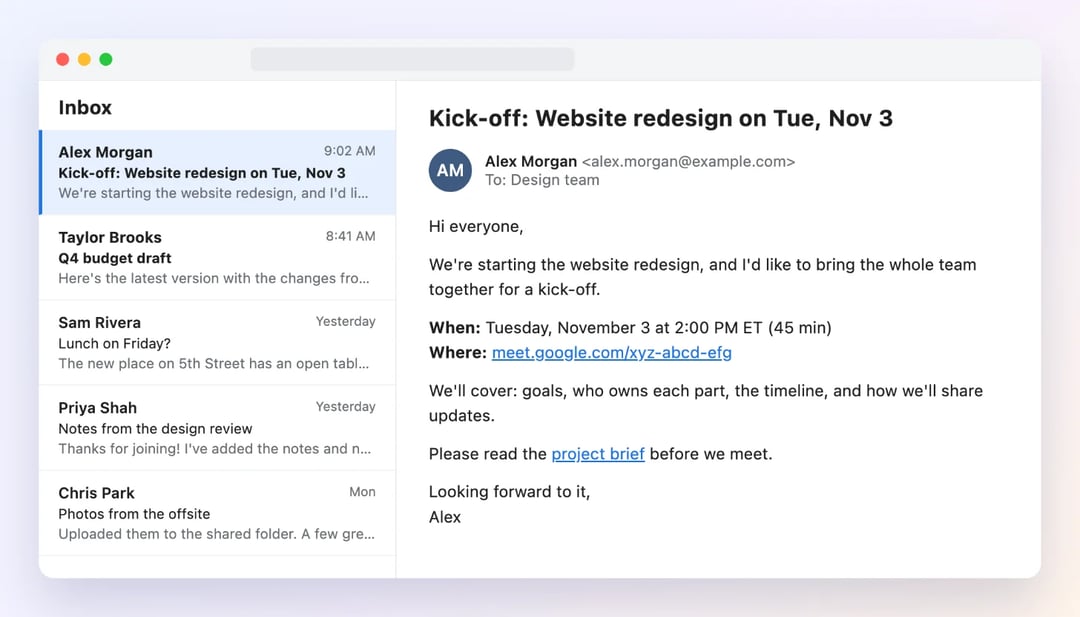
- A subject line that says it all. The meeting name and the date: "Kick-off: Website redesign on Tue, Nov 3". People should know what it is without opening it.
- The purpose, in one sentence. "The goal is to agree on the launch date." If you can't write this sentence, you may not need the meeting.
- The day, the date, the time and the time zone. Write "Tuesday, November 3 at 2:00 PM ET", not "Tuesday afternoon". When people are in different time zones, give the time in theirs.
- Where, or how to join. The room or the address, or the video link with any passcode and a dial-in number.
- Who's coming. Names and roles, when people don't all know each other.
- An agenda. 3 to 5 items, with who leads each one. It keeps the meeting on track and helps people decide if they need to be there.
- What to prepare. A doc to read, numbers to bring, ideas to think about.
- A clear ask. "Please confirm by Friday", or a link to pick or vote on a time.
Subject lines that work
Short subject lines with the meeting name and the date get read, even on a phone. Change the first word when the status changes, so people can tell an invitation from an update at a glance:
| Situation | Subject line |
|---|---|
| A new invitation | Invitation: Q4 planning on Tue, Nov 3 at 2 PM |
| You need a time first | When can you meet? Q4 planning next week |
| The time is set | Confirmed: Q4 planning on Tue, Nov 3 at 2 PM |
| The time changed | Updated: Q4 planning moved to Thu, Nov 5 at 2 PM |
| It's canceled | Canceled: Q4 planning on Tue, Nov 3 |
Email or calendar invite?
A calendar invite puts the meeting in everyone's calendar, but it's easy to miss and hard to explain anything in. An email gives the context. Use both in the right order:
| Who you're inviting | What to send |
|---|---|
| Your own team | A calendar invite with the agenda in the description. A short chat message is enough context. |
| Colleagues in other teams | A calendar invite, with 1 or 2 lines on why you need them |
| Clients and new contacts | An email first, then the calendar invite once they agree, or a link so they pick a time |
| Senior leaders | An email or a message to them (or their assistant) first. Then the calendar invite. |
| A group with no time set | A poll, so everyone votes on the time. Then the calendar invite. |
Meeting invitation tips
- Send it early. 1 to 2 days ahead is fine for your own team. Give clients and senior leaders 3 to 5 days, or more for a long meeting.
- Only invite the people you need. Everyone else can get the notes.
- Keep the meeting as short as the goal allows. A 25-minute meeting with a clear goal beats a 60-minute one without it.
- Put the agenda in the calendar invite too, so people can find it without digging up your email.
- Send an update when anything changes, with "Updated:" in the subject line, so nobody follows the old details. These reschedule meeting email templates cover every case.
Find the time and send the invite with zcal
The hardest part of a meeting invitation isn't the wording. It's the time. 5 people, 5 calendars, and an email chain of "Tuesday's bad for me, how about Thursday?" that eats a week. zcal, a free scheduling app, turns that chain into one link.
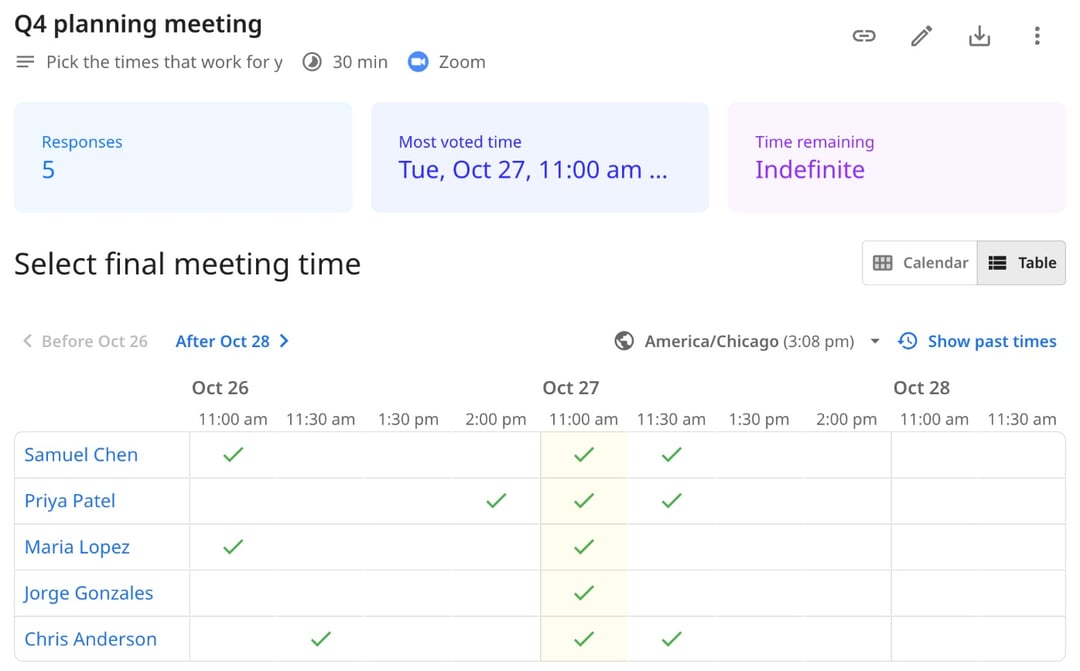
- For a group, send a meeting poll (template 12). You pick a few times next to your calendar, everyone marks the ones they can make, and you see the best time at a glance. When you pick it, zcal adds the meeting to your calendar and sends the calendar invite to everyone who voted, with a Zoom, Google Meet or Microsoft Teams link. Polls are free, with no limit on polls or voters.
- For one person, share your booking page (templates 5, 8, 10, 11 and 15). They see your open times in their own time zone, pick one, and get the invite and the video link right away.
No back-and-forth, no time zone math, and no invite to write by hand. Try zcal free. To make sure everyone actually shows up, follow up with one of these meeting reminder templates.
Frequently asked questions
How do I write a meeting invitation email?
How do I send an email as a meeting invite?
What is a good invitation message for a meeting?
How far in advance should you send a meeting invitation?
How do I write a professional meeting invitation?
Related Articles
There's a better way to schedule meetings
Join zcal freeWant unlimited booking links, polls and reminders for free?
Try zcal free