
Reschedule Meeting Email: 16 Templates with Polite Wording
Published October 27, 2026

At a glance
To reschedule a meeting politely, give as much notice as you can, apologize once, give a short reason, and offer 2 or 3 new times or a link to pick one. Then update the calendar invite. Below are 16 reschedule meeting email templates you can copy, with text and chat versions, and replies for when someone asks you to reschedule.
Rescheduling is a normal part of work. Calendars collide, people get sick, and priorities shift. What people remember isn't that you moved the meeting, but how: a quick, clear note with new times feels respectful, while a vague "something came up, let's find another time" hands them a chore and leaves the meeting in limbo.
The templates below cover the cases you'll actually run into, from a sick day to a client meeting you need to push, plus what to say when the other person asks you to move. Each one has a subject line, a note on when to use it, and why it works. Click Copy, swap the [brackets] for your details, and send.
Table of contents
Reschedule meeting email templates
1. General reschedule request
Use it when you need to move a meeting and have at least a day's notice.
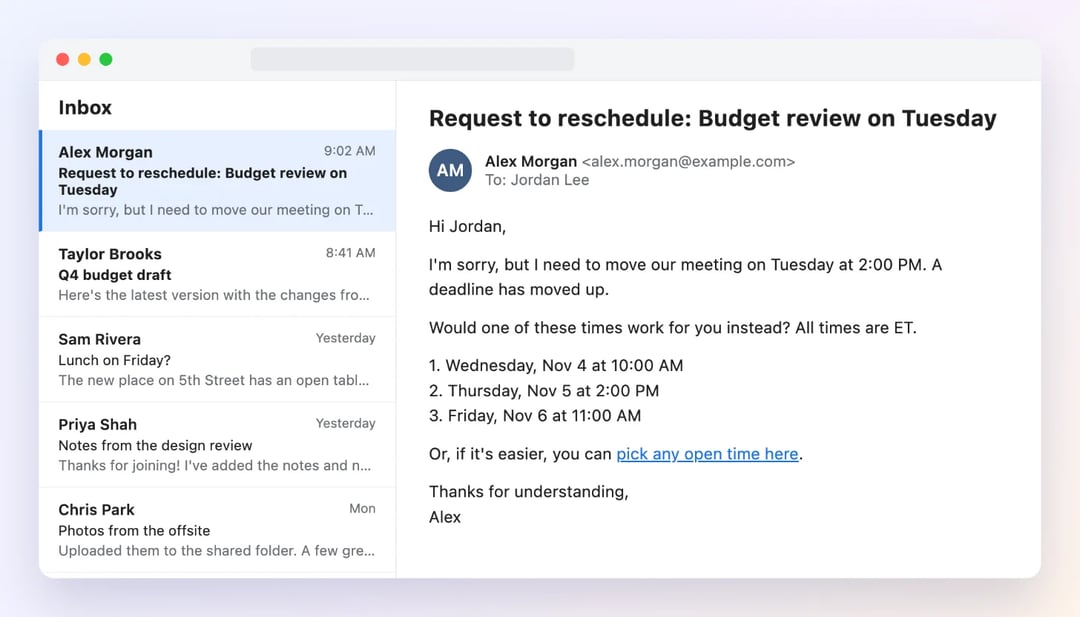
Subject: Request to reschedule: [meeting name] on [day]
Hi [first name],

I'm sorry, but I need to move our meeting on [day] at [time]. [Short reason, for example: a deadline has moved up.]

Would one of these times work for you instead? All times are [time zone].
1. [day], [date] at [time]
2. [day], [date] at [time]
3. [day], [date] at [time]

Or, if it's easier, you can pick any open time here: [booking link]

Thanks for understanding,
[your name]
Hi [first name], sorry, I need to move our [day] meeting. Could we do [day] at [time] or [day] at [time] instead?
Why it works: one apology, one line of reason, and concrete times. The other person can answer with one word, instead of starting a hunt for a new slot.
2. Reschedule a client meeting
Use it when the meeting is with a client, a customer or anyone outside your company. Lead with their time, not your problem.
Subject: New time for our [meeting name]?
Hi [first name],

I want to make sure we give [topic] the attention it deserves, and I'm not able to do that on [day] at [time] as planned. I'm sorry for the change.

Could we move our meeting to one of these times? All times are [time zone].
1. [day], [date] at [time]
2. [day], [date] at [time]

If neither works, you can choose any time that suits you here: [booking link]

Everything we planned to cover is still on track, and I'll send the agenda again with the new invite.

Best regards,
[your name]
[company]
Why it works: it tells the client the work is still on track, so a moved meeting doesn't look like a dropped ball.
3. Last-minute reschedule
Use it when you need to move a meeting on the same day. Send a text or chat message too, because they may not see an email in time.
Subject: Today's [time] meeting: need to reschedule
Hi [first name],

I'm very sorry for the short notice, but I can't make our meeting today at [time]. [Short reason.]

I know this is last minute, so I'll make it as easy as possible: pick any time that works for you here, and it's yours: [booking link]

Again, my apologies.
[your name]
Hi [first name], it's [your name]. So sorry, I can't make our [time] meeting today. Can we move it? Pick any time here: [booking link]
Why it works: it owns the short notice and gives the other person full control of the new time, which is the fairest trade for the trouble.
4. Out sick
Use it when you wake up sick. Keep it short. Nobody needs the details.
Subject: Out sick today: can we move our meeting?
Hi [first name],

I'm out sick today, so I need to move our meeting at [time]. I'm sorry for the late change.

I expect to be back by [day]. Would [day] at [time] or [day] at [time] work for you? Or pick a time here: [booking link]

Thanks for understanding,
[your name]
Hi [first name], it's [your name]. I'm out sick today, so I need to move our [time] meeting. Sorry! I'll send new times when I'm back.
Why it works: "out sick" is all the reason anyone needs, and the new times show you're not leaving them hanging.
5. Personal emergency
Use it when something urgent and private comes up. You don't owe anyone the details.
Subject: Need to postpone our meeting on [day]
Hi [first name],

Due to an unexpected personal matter, I need to postpone our meeting on [day] at [time]. I'm sorry for the short notice.

I'll be in touch by [day] with new times. If it's urgent before then, [name] can help at [email].

Thank you for understanding,
[your name]
Why it works: "an unexpected personal matter" is honest and closes the topic. A backup contact keeps anything urgent moving.
6. Double-booked
Use it when you find out you double-booked yourself: 2 things at the same time.
Subject: Scheduling conflict: [meeting name] on [day]
Hi [first name],

I've just realized I double-booked myself on [day] at [time], and I'm sorry about that. I'd rather move our meeting now than cut it short.

Could we meet on [day] at [time] or [day] at [time] instead? Or choose any time here: [booking link]

Thanks,
[your name]
Why it works: it owns the mistake and turns it into a good reason: you want their full attention, not half of it.
7. Team meeting moved
Use it to tell a group the new time. When it's your meeting, set the time and tell everyone, instead of asking 6 people to agree.
Subject: Updated: [meeting name] moved to [new day] at [new time]
Hi team,

Our [meeting name] has been moved from [old day] at [old time] to [new day], [date] at [new time] [time zone].

The calendar invite has been updated. The agenda and the link stay the same: [video link]

If the new time doesn't work for you, let me know by [day], and send any updates in writing.

Thanks,
[your name]
Heads-up: [meeting name] moved from [old day] to [new day] at [new time]. Invite updated, same link. Let me know if that's a problem!
Why it works: "Updated:" in the subject line, the old time and the new time side by side. Nobody can mistake it for the original invite.
8. Postpone with no new date yet
Use it when you can't pick a new time yet, for example while you wait on a decision or a delivery.
Subject: Postponing [meeting name] for now
Hi [first name],

I'd like to postpone our meeting on [day] at [time]. [Reason, for example: we're still waiting on the final numbers, and the meeting will be more useful once we have them.]

I'll send new times by [date]. Until then, I've removed the meeting from our calendars, so the time is free.

Thanks for your patience,
[your name]
Why it works: a date for the next step ("by Friday") keeps the meeting from quietly disappearing.
9. Reschedule an appointment with a client
Use it when you run a service business and need to move a client's appointment. Make it as easy as possible for them.
Subject: Your appointment on [day]: can we find a new time?
Hi [first name],

I'm sorry, but I need to reschedule your [service] on [day] at [time]. [Short reason.]

Please choose any new time that suits you here: [booking link]

If you'd like, I can also hold [day] at [time] for you. Just reply to this email. Thank you for your understanding, and I'm sorry for the trouble.

Best,
[your name]
[business]
[business]: Sorry, [first name], we need to move your appointment on [day]. Please pick a new time here: [booking link]
Why it works: the client picks the new time, so they're not stuck waiting for you to offer one.
10. Ask to reschedule a job interview
Use it when you're the candidate and need a new time. Ask early, and offer several options.
Subject: Request to reschedule my interview on [day]
Hi [first name],

Thank you again for the invitation to interview for the [job title] role. Unfortunately, [short reason, for example: I have a work commitment I can't move] on [day] at [time].

I'm very interested in the role, and I'm happy to fit around your team's schedule. Would any of these times work?
1. [day], [date] at [time]
2. [day], [date] at [time]
3. [day], [date] at [time]

I'm sorry for any inconvenience.

Best regards,
[your name]
Why it works: it repeats your interest in the role, so the request doesn't read as a lack of it. More interview templates cover the employer's side.
11. Reschedule with a link to pick a time
Use it when you don't want to play calendar tennis. The other person picks a time that works for them.
Subject: Let's find a new time for [meeting name]
Hi [first name],

I need to move our meeting on [day] at [time], and I'm sorry for the change.

To save us a few emails, here's a link that shows all my open times: [booking link]

Just pick the one that works best for you, and the new invite will go out right away.

Thanks,
[your name]
Why it works: it turns a 4-email back-and-forth into one click for the other person.
12. No reply to your reschedule request
Use it 1 to 2 days after you asked to reschedule and heard nothing.
Subject: Re: Request to reschedule [meeting name]
Hi [first name],

Just following up on my note about moving our meeting. I'd still like to find a time.

Would [day] at [time] work? If so, I'll send the invite. Or you can pick another time here: [booking link]

Thanks,
[your name]
Why it works: one specific time is easier to say yes to than a list.
13. They missed the meeting
Use it when the other person didn't show up. Assume the best, and make it easy to rebook.
Subject: Sorry we missed each other today
Hi [first name],

I was on the call at [time] today, but it looks like we missed each other. I hope everything is OK.

I'd still love to talk. Would you like to pick a new time? [booking link]

Best,
[your name]
Why it works: "we missed each other" is kind, saves face, and gets far more replies than "you didn't show up".
Replies when someone asks you to reschedule
14. Accept and suggest new times
Subject: Re: Request to reschedule [meeting name]
Hi [first name],

No problem at all, these things happen! Here are a few times that work for me:
1. [day], [date] at [time]
2. [day], [date] at [time]

Or grab any open time here: [booking link]

Talk soon,
[your name]
15. Confirm the new time
Subject: Confirmed: [meeting name] on [new day] at [new time]
Hi [first name],

[new day] at [new time] [time zone] works great. I've updated the calendar invite, and the link is the same: [video link]

See you then,
[your name]
Hi [first name], [new day] at [new time] works. I've updated the invite. See you then! - [your name]
16. A firm reply after several reschedules
Use it after the 2nd or 3rd move, to keep the relationship and protect your time.
Subject: Re: [meeting name]
Hi [first name],

No problem. I know things are busy on your side.

Since we've had to move this a few times, I'd suggest we pick a time when things settle down. Here's my calendar, so you can book a time you're sure you can keep: [booking link]

Whenever you're ready, I'm happy to meet.

Best,
[your name]
How to reschedule a meeting politely
To reschedule a meeting politely, tell the other person as early as you can, apologize once, and give a short reason. Offer 2 or 3 specific new times, or a link to pick one, and update or cancel the original calendar invite, so nobody shows up at the old time.
- Give at least 24 hours' notice when you can. The earlier you ask, the less it costs the other person.
- Apologize once. One "I'm sorry for the change" is polite. Three sounds like a crisis.
- Keep the reason short. "A conflict came up" or "I'm out sick" is enough. You never owe anyone private details.
- Offer specific times. "Let me know when you're free" hands the other person the work. 2 or 3 times, with the time zone, or a link to your calendar, is easier to answer.
- Fix the calendar. Update the original invite, or cancel it and send a new one, so no "ghost" meeting stays in anyone's calendar.
- Follow up after 1 to 2 days if you hear nothing.
- Don't make it a habit. Moving the same meeting twice is OK. Moving it 4 times tells people where they rank.
Pick the right channel
| Situation | How to tell them |
|---|---|
| A day or more ahead | Email, and update the calendar invite |
| Same day | A text or chat message first, then the email |
| An important client, or a lot is at stake | A short call, then an email with the new time |
| Your own team | A chat message and an updated invite |
| A senior leader | Their assistant, or an email with 2 or 3 options |
Wording to reschedule a meeting
Mix and match these phrases for each part of your message:
| Part | Formal | Casual |
|---|---|---|
| Opening | "I'm writing about our meeting on Tuesday at 2 PM." | "Quick note about our Tuesday meeting." |
| The ask | "I'm afraid I need to reschedule." | "Could we move it?" |
| The reason | "An unexpected conflict has come up." | "Something came up that I can't move." |
| The apology | "I apologize for the inconvenience." | "Sorry for the shuffle!" |
| New times | "Would Thursday at 10 AM or Friday at 2 PM suit you?" | "Does Thursday at 10 or Friday at 2 work?" |
| Closing | "Thank you for your understanding." | "Thanks for being flexible!" |
Subject lines for a reschedule email
- Request to reschedule: [meeting name] on [day]
- New time for our [meeting name]?
- Updated: [meeting name] moved to [new day] at [new time]
- Postponing [meeting name] for now
- Confirmed: [meeting name] on [new day] at [new time]
Put the meeting name and the day in every subject line, so the email can't be confused with the original meeting invitation.
Let people reschedule themselves with zcal
Even the best reschedule email starts a chain: you offer times, they check their calendar, they reply, you send a new invite. Multiply that by every client, every week. zcal, a free scheduling app, skips the chain: when people book you through your booking page, they can move the meeting themselves, in a few clicks.
- A reschedule link in every message. The confirmation email and the reminder for each booking include a link to reschedule or cancel. Your guest picks a new time from your live availability, and the meeting moves on both calendars. No emails needed.
- When you need to move it, reschedule the meeting from your event list, and zcal emails your guest the new time. Or send template 11 with your booking link, and let them pick.
- Reminders follow the new time. If a meeting moves, its reminders move with it. If it's canceled, no reminder goes out.
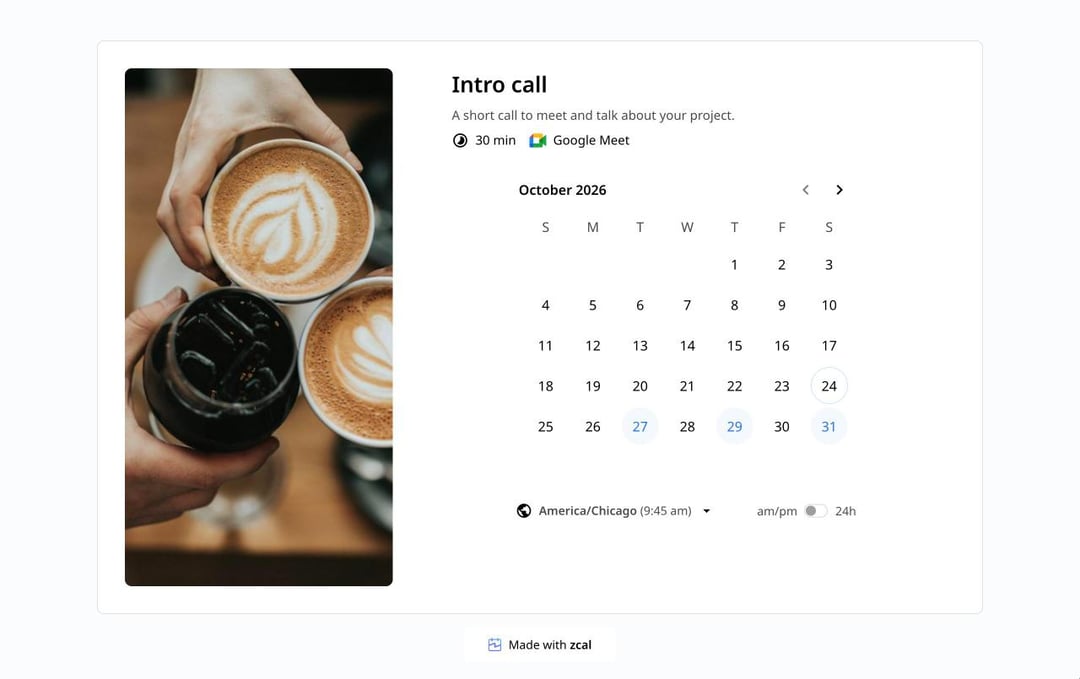
The booking page, the confirmations, the reminders and the reschedule links are all on zcal's free plan. Try zcal free. For the messages that go out before the meeting, see our meeting reminder templates.
Frequently asked questions
How do you politely reschedule a meeting?
What's the best wording to reschedule a meeting?
How much notice should you give to reschedule a meeting?
How do you say a meeting has been rescheduled?
Is it unprofessional to reschedule a meeting?
Related Articles
There's a better way to schedule meetings
Join zcal freeWant unlimited booking links, polls and reminders for free?
Try zcal free