
What Is Double Booking? Causes, Fixes and What to Say
Published October 24, 2026

At a glance
Double booking is when two meetings, appointments or reservations land in the same time slot for the same person, room or resource. Most double bookings are mistakes: someone booked a time that looked free because a calendar wasn't checked. A few businesses, such as busy clinics, double-book on purpose to cover no-shows.
A double booking always costs someone. A client sits in a waiting room, a guest stares at an empty video call, or you have to send the "I'm so sorry" email. The good news: almost every double booking has the same few causes, and each one has a simple fix. This guide explains what double booking means, why it happens, how to stop it, and what to say when it happens anyway.
Table of contents
What does double booking mean?
To double-book is to give the same time to 2 people or 2 events. You'll see it written as double booking, double-booking and double-booked. They all mean the same thing.
It shows up in a few places:
- Your own calendar: a client call at 2 PM on top of a dentist appointment.
- Appointments: 2 clients booked with the same hairstylist, therapist or tutor at 10 AM.
- Rooms and equipment: 2 teams that both reserved the big meeting room for Monday morning.
- Hotels, airlines and restaurants: 2 guests promised the same room, seat or table.
People often mix it up with 2 close terms:
| Term | What it means | On purpose? | Example |
|---|---|---|---|
| Double booking | 2 bookings for the same person or resource at the same time | Usually not | A client call and a dentist visit, both at 2 PM |
| Overbooking | More bookings than there are seats or rooms, because some people won't show up | Yes | An airline that sells 105 seats on a 100-seat plane |
| Overlapping appointments | A provider starts a second client while the first one waits | Yes | A stylist cuts one client's hair while another's color sets |
Why double bookings happen
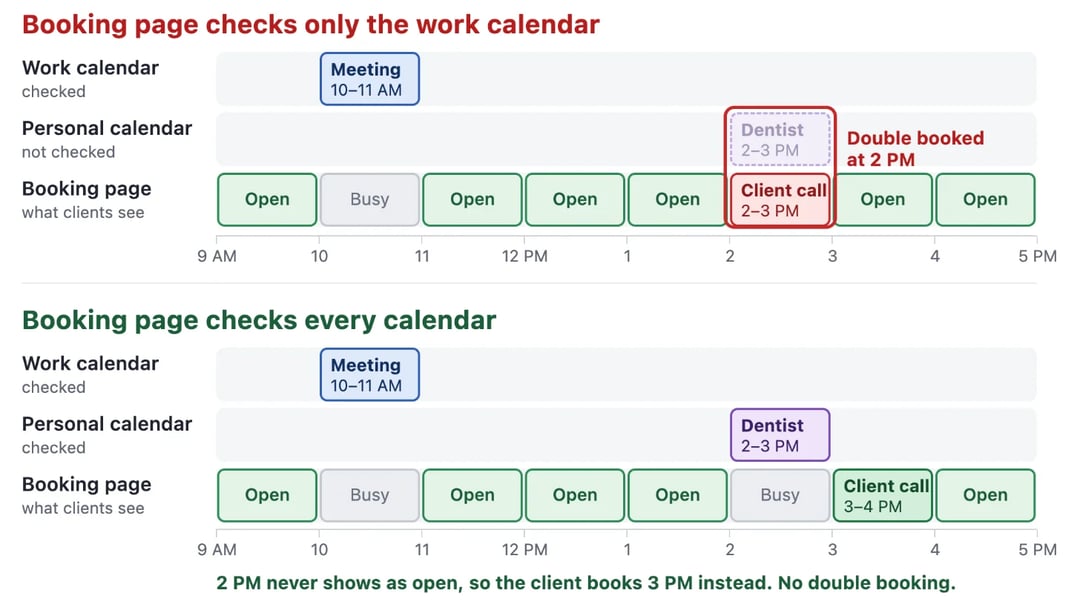
Here's the most common cause in one picture. The booking page only checks the work calendar, so it never sees the dentist appointment on the personal one:
The full list of causes:
- A calendar that nobody checks. You have a work calendar, a personal calendar and maybe a shared family calendar. A booking link that reads only one of them will offer times that are taken in the others. Merging your Google calendars helps you see clashes, but your booking tool still needs to check every calendar.
- Events marked "free". In Google Calendar and Outlook, you can mark an event as free instead of busy. Booking tools then treat that time as open. All-day events are often marked free by default, so check yours.
- Invites you haven't answered. Some tools ignore events you haven't accepted. Google's own booking pages, for example, don't let unaccepted or tentative events block a time.
- Bookings that skip the system. A client books by phone, text or email, and nobody adds it to the calendar. The calendar still shows the time as free.
- Two people book at the same moment. If a tool only checks the calendar when the page loads, 2 people can grab the same slot a few seconds apart.
- A team that can't see each other's calendars. A receptionist books a provider who's already in a meeting that only the provider can see.
- Time zone mix-ups. "3 PM" in an email means different times in New York and London. Someone books the wrong one.
- Slow sync. A calendar that copies events once an hour, or a subscribed calendar that refreshes slowly, leaves a window where a taken time still looks free.
How to avoid double booking
- Connect every calendar to your booking link. Work, personal, shared: if it can hold an event, your booking tool needs to read it.
- Keep one source of truth. Pick one place where every booking ends up, even the ones made by phone. If a client calls, add it there before you hang up.
- Mark real events as busy. Check that your important events, and all-day events like travel days, say "busy", not "free".
- Send a booking link instead of trading emails. A link shows the real open times in the guest's own time zone, so nobody has to guess.
- Add buffer time. A 10 to 15 minute gap means a meeting that runs over doesn't collide with the next one.
- Set a minimum notice. Stop people from booking you 10 minutes from now, before you've had a chance to see it.
- Cap your day. A daily limit on bookings keeps a busy day from turning into a pile-up.
- Use team scheduling for teams. On a round robin link, each booking goes to a host who is free. On a collective link, clients only see times when every host is free.
How zcal stops double bookings
A booking page can only protect the calendars it can see. That's why most double bookings happen with tools that check one calendar, or only part of it.
zcal is a free scheduling app built to check them all:
- Every calendar, on every plan. Connect up to 10 calendar accounts from Google, Outlook and Apple (iCloud), and pick which calendars to check for conflicts.
- Unanswered invites count as busy. zcal blocks the time for events you haven't answered yet, and for tentative ones. It only ignores events you've declined or marked as free.
- A second check when someone books. zcal checks your calendars again the moment a guest confirms, so a time that was taken a second ago can't be booked.
- Seats that stop at the limit. On a group event, the slot closes when it's full.
- Buffers, notice and limits. Add a buffer before or after each meeting, a minimum notice, and a cap on bookings each day or week.
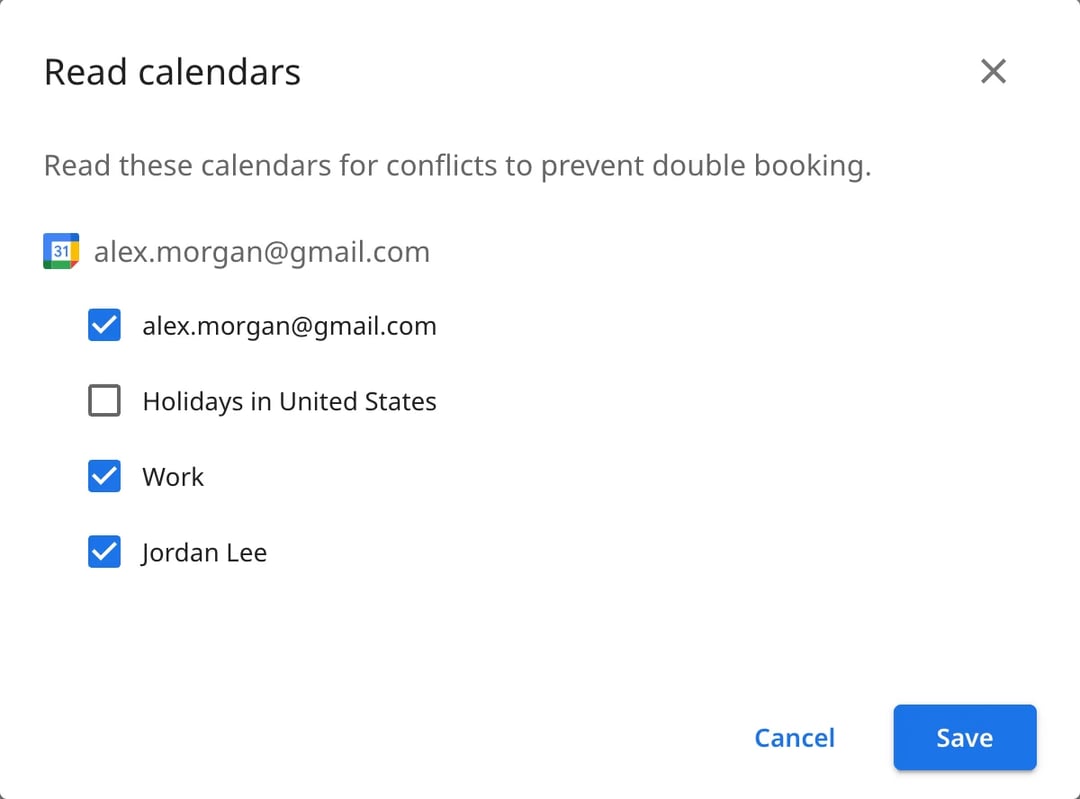
Create a free booking page, connect your calendars, and your guests only ever see times when you're really free.
When double booking on purpose makes sense
Some businesses double-book on purpose:
- Clinics book 2 patients in some slots, because a share of patients don't show up.
- Salons start a second client while the first one's color is setting.
- Group sessions put several people in one slot on purpose, such as a class or a workshop.
It can fill empty time. But when everyone shows up, someone waits, the provider rushes, and the next 3 appointments run late. That last client may not come back.
Our take: for most small businesses, don't. Fight no-shows with reminders instead. A reminder the day before costs nothing and doesn't make anyone wait. If you do run group sessions, use a booking tool with a seat limit, so the slot closes when it's full.
What to do when you double-book someone
- Tell them fast. The sooner you write, the more options they have. Don't wait until the meeting starts.
- Own it. One short apology. No long story about why it happened.
- Make it easy to rebook. Offer 2 or 3 new times, or your booking link, so they can pick in one step.
- Make it up to them if it cost them something. A paying client who rearranged their day deserves a discount or an extra 15 minutes.
- Fix the cause. Find which of the causes above it was, so it doesn't happen again.
You can copy these messages:
Subject: I double-booked our [day] meeting, sorry
Hi [first name],

I'm sorry, I made a mistake and double-booked our meeting on [day] at [time].

Could we move it to one of these times instead? All times are [time zone].
1. [day] at [time]
2. [day] at [time]

Or pick any time that suits you here: [booking link]

Thank you for your patience, and sorry again for the trouble.

[your name]
Hi [first name], so sorry, I double-booked our [day] [time] meeting. Could you pick a new time here? [booking link]
Frequently asked questions
What is a double booking?
What is a disadvantage of double booking?
What is it called when you have 2 appointments at the same time?
How do I stop getting double-booked in Google Calendar?
Is it double-booked or double booked?
Related Articles
There's a better way to schedule meetings
Join zcal freeWant unlimited booking links, polls and reminders for free?
Try zcal free