
20 Appointment Reminder Templates for Text and Email (Copy and Paste)
Published October 22, 2026

At a glance
A good appointment reminder names your business, the day and time, the place or the video link, and how to reschedule. Send an email 1 to 2 days before and a short text on the day. Below are 20 appointment reminder templates, each with an email and a text version you can copy.
Every empty chair has a price. If one client a day misses an $80 appointment, that's $400 a week and about $20,000 a year, gone, with nothing to show for it. Most of those clients didn't mean to skip. They forgot, mixed up the day, or couldn't find the address in time.
A reminder at the right moment fixes all of that, and it takes 30 seconds to send. Every template below comes in 2 versions: an email with the full details, and a text short enough to read at a glance on a lock screen. Click Copy, swap the [brackets] for your details, and send. And if you'd rather never send another reminder by hand, the end of this post shows how to make them go out on their own.
Table of contents
What to put in an appointment reminder
An appointment reminder should tell your client who it's from, when to come, where to go, and what to do if plans change, all in the first few lines. Put the day and the time in the subject line of an email and the first line of a text, because many people only ever see the preview.
- Your business name, first. A text from an unknown number that says "See you tomorrow!" looks like spam. "Northside Dental: see you tomorrow at 10 AM" doesn't.
- The day, the date and the time. Write "Tuesday, Nov 3 at 10:00 AM", not "tomorrow morning". For online appointments, add the time zone, or the time in the client's own zone.
- Where to go. The address, with the suite or the floor and a word on parking. For a video call, the link itself, not "the link in my earlier email".
- What to bring or prepare. Forms, an ID, a list of questions, comfortable clothes. One useful line makes the reminder worth reading.
- How to reschedule or cancel. A link or a phone number turns a likely no-show into a new booking. If you have a cancellation policy, mention it in one short line.
- A way to reach you. Your phone number, for the client who's running late or can't find the door.
Match the tone to your business
The right tone depends on who's coming through your door. A salon can sound like a friend. A law office shouldn't.
| Business | Tone | An opening line that fits |
|---|---|---|
| Salon, spa, barber | Warm and casual | "Hi Jordan! Can't wait to see you tomorrow." |
| Dental or medical office | Clear and reassuring | "This is a reminder of your appointment with Dr. Patel." |
| Therapy or counseling | Calm and private | "This is a reminder of your session on Thursday." |
| Coaching or consulting | Friendly and professional | "Looking forward to our call tomorrow." |
| Legal or financial services | Formal | "This is to confirm your appointment on Monday, March 9." |
Ask for a reply, or send a link?
"Reply YES to confirm" is popular, and it works well when you text from your own phone or from a tool that reads replies. Each answer lands in your inbox, and you can see who has confirmed. But many reminder tools send one-way texts, and a "YES" sent to them goes nowhere.
A link works with any tool and asks less of the client. They tap it, see the booking, and reschedule or cancel on the spot, without a back-and-forth. Most templates below use a link. Where a reply makes more sense, the template says so.
When to send appointment reminders
For most appointments, send an email 1 to 2 days before and a text 2 to 24 hours before. Add a reminder 1 week ahead when the appointment was booked weeks in advance, and a short text 1 hour before an online session, when the client needs the link right away.
| Appointment | First reminder | Second reminder | Best channel |
|---|---|---|---|
| Dentist or doctor | 2 days before | Morning of the visit | Email, then a text |
| Salon, spa or barber | 1 day before | 2 to 3 hours before | Text |
| Therapy or counseling | 1 day before | – | Email or text, with no details |
| Coaching or consulting call | 1 day before | 1 hour before, with the link | Email, then a text |
| Tutoring or music lesson | 1 day before, to the parent | – | Text |
| Personal training or a class | The evening before | – | Text |
| Home service visit | 1 day before, with the arrival window | When you're on the way | Text |
| Booked 3 or more weeks ahead | 1 week before | 1 day before | Email, then a text |
2 reminders work better than 1, and 3 is plenty. More than that starts to feel like nagging. Send them during the day, between about 9 AM and 6 PM in the client's time zone. A text at 7 AM about a haircut won't win you any fans.
Keep each text under 160 characters, so it arrives as 1 message, and leave out emoji: a single emoji drops the limit to 70 characters, and your text gets split in 2. Put the day and the time in the first line, where the lock screen shows it.
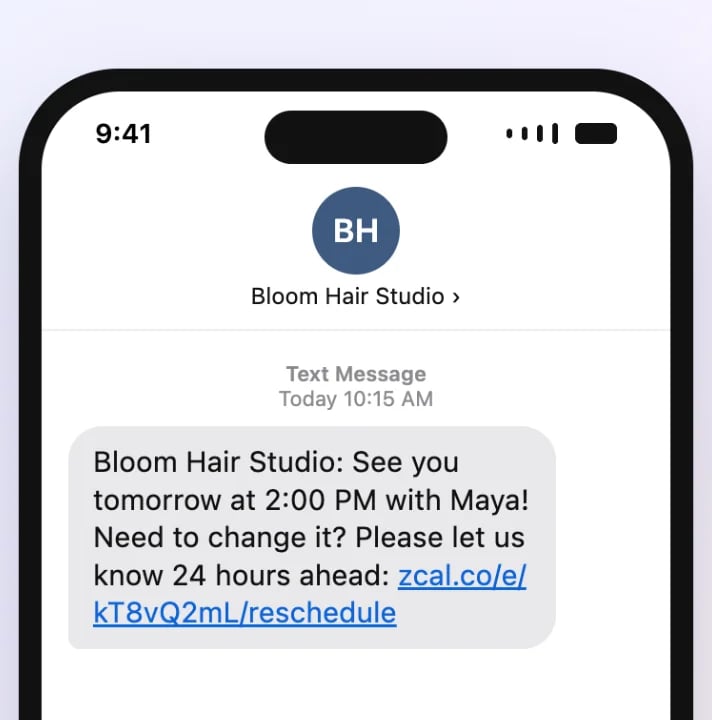
Before you text a client, get their OK to text them, for example with a phone number field and a short note when they book. Then stop at once if they ask you to. It's good manners, and in the US, the rules on business texts expect it.
General appointment reminders
Each template below has an email version and a text version. The texts stay under 160 characters once you fill them in with short details, and they use only plain characters, so each one goes out as a single message.
1. Simple appointment reminder
Use it for any appointment, 1 or 2 days before.
Subject: Reminder: your appointment on [day] at [time]
Hi [first name],

This is a reminder of your appointment with [business] on [day], [date] at [time].

Where: [address]

If you need to change the time, you can reschedule here: [reschedule link]

See you soon,
[your name]
[business] | [phone]
[business]: Hi [first name], a reminder of your appointment on [day] at [time]. Need to reschedule? [reschedule link]
2. Friendly and casual reminder
Use it when your clients know you by your first name.
Subject: See you [day], [first name]!
Hi [first name],

Just a friendly reminder that you're booked in with me on [day] at [time]. I'm looking forward to it!

You'll find me at [address]. Parking is [parking note].

If something has come up, no problem. You can pick a new time here: [reschedule link]

See you soon,
[your name]
Hi [first name]! It's [your name] from [business]. See you [day] at [time]! If something came up, pick a new time here: [reschedule link]
3. Formal reminder
Use it for law, accounting, financial and other professional offices.
Subject: Appointment reminder: [day], [date] at [time]
Dear [title] [last name],

This is a reminder of your appointment with [provider name] at [business] on [day], [date] at [time].

Location: [address]
Please bring: [documents]

If you need to reschedule, please use this link or call our office at [phone] at least [notice] in advance: [reschedule link]

Kind regards,
[your name]
[business]
[business]: Reminder of your appointment with [provider name] on [date] at [time]. To reschedule, call [phone] or visit [reschedule link]
Reminders for each step before the appointment
4. One week before
Use it when the appointment was booked a month or more ago, so it doesn't come as a surprise.
Subject: Coming up next week: your appointment on [day], [date]
Hi [first name],

A quick heads-up: your appointment with [business] is next week, on [day], [date] at [time].

It was booked a while ago, so please take a moment to check that the time still works. If it doesn't, you can choose a new one here: [reschedule link]

We'll send you another reminder the day before.

Thanks,
[your name]
[business]
[business]: Your appointment is next week, [day] [date] at [time]. Still works? If not, pick a new time: [reschedule link]
5. Two days before, with a request to confirm
Use it when no-shows hurt the most, such as long or high-value appointments. A text sent from your own phone gets the replies.
Subject: Please confirm: your appointment on [day] at [time]
Hi [first name],

Your appointment with [business] is in 2 days, on [day], [date] at [time].

Could you reply to this email to let us know you're still coming? If the time no longer works, you can reschedule here: [reschedule link]

Thank you,
[your name]
[business] | [phone]
[business]: Hi [first name], your appointment is [day] at [time]. Reply YES to confirm, or reschedule here: [reschedule link]
6. The day before
Use it for nearly every appointment. It's the reminder that prevents the most no-shows.
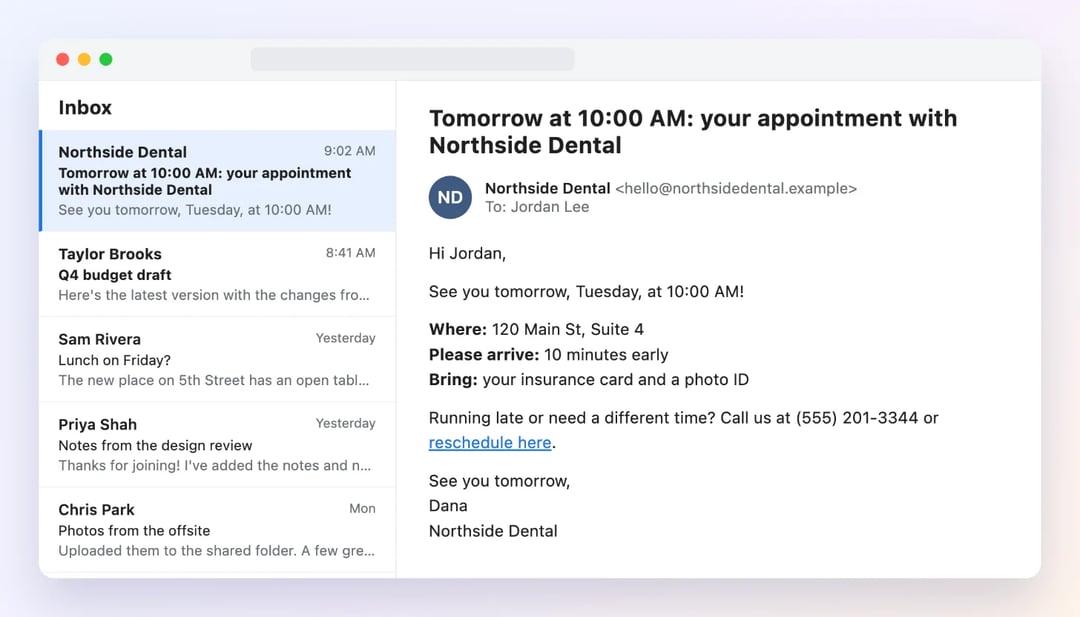
Subject: Tomorrow at [time]: your appointment with [business]
Hi [first name],

See you tomorrow, [day], at [time]!

Where: [address]
Please arrive: [minutes] minutes early
Bring: [what to bring]

Running late or need a different time? Call us at [phone] or reschedule here: [reschedule link]

See you tomorrow,
[your name]
[business]
[business]: See you tomorrow at [time], [first name]! [address]. Need a new time? [reschedule link]
7. The morning of the appointment
Use it for appointments later in the day, especially walk-in-busy businesses such as salons and clinics.
Subject: Today at [time]: see you soon!
Hi [first name],

A quick reminder that we'll see you today at [time] at [address].

If anything has changed, please let us know as early as you can, so we can offer your time to someone on our waitlist: [reschedule link]

See you later,
[your name]
[business]
[business]: Hi [first name], see you today at [time]! Can't make it? Please let us know: [reschedule link]
8. One hour before an online appointment
Use it for video sessions, so the link is right at hand.
Subject: Starting in 1 hour: your session at [time]
Hi [first name],

Your session with [your name] starts in 1 hour, at [time] [time zone].

Join here: [video link]

Tip: open the link a few minutes early to test your camera and sound.

See you soon,
[your name]
Hi [first name], your session with [your name] starts at [time]. Join here: [video link]
Appointment reminders for each type of business
9. Dental or medical appointment
Use it for dental, medical, eye and physical therapy visits. Keep health details out of the message: the client knows why they're coming.
Subject: Reminder: your visit to [business] on [day] at [time]
Hi [first name],

This is a reminder of your appointment with [provider name] at [business] on [day], [date] at [time].

Please arrive [minutes] minutes early and bring:
1. Your insurance card and a photo ID
2. A list of any medicines you take

Address: [address]

To reschedule, please call us at [phone] or use this link at least [notice] in advance: [reschedule link]

Thank you,
[business]
[business]: Reminder of your visit with [provider name] on [day] at [time]. Please bring your insurance card. To reschedule: [reschedule link]
10. Salon, spa or barber appointment
Use it for haircuts, color, nails, massage and other beauty services.
Subject: See you [day] for your [service], [first name]!
Hi [first name],

Your [service] with [stylist name] is booked for [day] at [time]. We can't wait to see you!

A few things to know:
1. Please arrive 5 minutes early, so we can start on time.
2. [prep note, for example: come with clean, dry hair]
3. Need to change your time? Please let us know at least [notice] ahead: [reschedule link]

See you soon,
[business]
[address]
[business]: See you [day] at [time] with [stylist name]! Need to change it? Please let us know [notice] ahead: [reschedule link]
11. Therapy or counseling session
Use it for therapy, counseling and other private sessions. Say as little as you need: a phone screen can be seen by others.
Subject: Your appointment on [day] at [time]
Hi [first name],

This is a reminder of your session on [day], [date] at [time].

[Location: address / Join online: video link]

If you need to change the time, you can reschedule here: [reschedule link]

Take care,
[your name]
Hi [first name], this is [your name]. A reminder of your appointment on [day] at [time]. To reschedule: [reschedule link]
12. Coaching or consulting call
Use it for coaching, consulting and advisory calls, the day before.
Subject: Our call tomorrow at [time] [time zone]
Hi [first name],

I'm looking forward to our call tomorrow, [day], at [time] [time zone].

Join here: [video link]

To get the most from our time, think about [one question or goal] before we start.

If something has come up, you can pick a new time here: [reschedule link]

Talk soon,
[your name]
Hi [first name], it's [your name]. Looking forward to our call tomorrow at [time] [time zone]. Join: [video link]
13. Tutoring or music lesson
Use it for lessons, written to the parent when the student is a child.
Subject: Reminder: [student name]'s lesson on [day] at [time]
Hi [first name],

This is a reminder that [student name]'s [subject] lesson is on [day] at [time] at [address or "online here: video link"].

Please have [student name] bring [what to bring].

If you need to move the lesson, you can choose a new time here: [reschedule link]

Thanks,
[your name]
Hi [first name], a reminder that [student name]'s [subject] lesson is [day] at [time]. To move it: [reschedule link] - [your name]
14. Personal training or fitness class
Use it the evening before a training session or a class with limited spots.
Subject: Tomorrow: [class or session] at [time]
Hi [first name],

You're booked for [class or session] tomorrow, [day], at [time].

Please bring water, a towel and [anything else]. Doors open [minutes] minutes before.

Can't make it? Please cancel by [cutoff time], so someone on the waitlist can take your spot: [cancel link]

See you there,
[your name]
[business]
[business]: You're booked for [class] tomorrow at [time]. Can't make it? Please cancel by [cutoff] so others can join: [cancel link]
15. Home service visit
Use it for cleaning, repairs, installs and other visits to the client's home. Give a time window, not a single time.
Subject: We'll see you [day] between [start time] and [end time]
Hi [first name],

[your name] from [business] will arrive on [day], [date] between [start time] and [end time] for your [service].

To help us get started quickly:
1. Please make sure we can get in, and let us know about any gate code or pets.
2. Clear the area around [work area].

We'll text you when we're on the way. Need a different day? Reschedule here: [reschedule link]

Thank you,
[business] | [phone]
[business]: We'll arrive [day] between [start] and [end] for your [service]. Gate code or pets? Reply here. To reschedule: [reschedule link]
16. Veterinary appointment
Use it for vet visits, grooming and pet care.
Subject: Reminder: [pet name]'s appointment on [day] at [time]
Hi [first name],

This is a reminder that [pet name] has an appointment with [provider name] at [business] on [day], [date] at [time].

Please bring:
1. [pet name]'s vaccination records, if this is a first visit
2. A leash or a carrier

To reschedule, call us at [phone] or use this link: [reschedule link]

See you and [pet name] soon,
[business]
[business]: [pet name]'s appointment is [day] at [time]. Please bring a leash or carrier. To reschedule: [reschedule link]
First visits, confirmations and missed appointments
17. First appointment with a new client
Use it before a first visit, when the client doesn't know where to go or what to expect.
Subject: Your first visit on [day]: what to know
Hi [first name],

Welcome to [business]! We're looking forward to meeting you on [day], [date] at [time].

Before you come:
1. Please fill in your new client form: [form link]
2. Plan to arrive [minutes] minutes early.
3. [parking or entrance note]

Your first visit takes about [length]. If you have questions, just reply to this email or call [phone].

To reschedule: [reschedule link]

See you soon,
[your name]
[business]
[business]: Welcome, [first name]! See you [day] at [time]. Please fill in your form before you come: [form link]
18. Prep instructions before the appointment
Use it when the client must do something before they arrive, such as bring documents or follow care instructions.
Subject: Before your appointment on [day]: please read
Hi [first name],

Your appointment with [business] is on [day] at [time]. To be ready, please:

1. [first instruction]
2. [second instruction]
3. [third instruction]

If you can't follow these steps in time, please reschedule here, so we can give you the full appointment: [reschedule link]

Thank you,
[your name]
[business]
[business]: Before your appointment on [day], please [short instruction]. Details are in your email. Questions? Call [phone]
19. Follow-up when the client hasn't confirmed
Use it when you asked for a confirmation and heard nothing back. Keep it light: most people just missed the first message.
Subject: Still on for [day] at [time]?
Hi [first name],

We haven't heard back about your appointment on [day] at [time], so we wanted to check in.

If you're still coming, no reply is needed. We'll see you then! If the time no longer works, please reschedule here, so we can offer the spot to someone else: [reschedule link]

Thanks,
[your name]
[business]
[business]: Hi [first name], still on for [day] at [time]? If not, please reschedule here so we can free the spot: [reschedule link]
20. Missed appointment
Use it on the same day as a no-show. Invite them back instead of scolding them, and mention a fee only if your policy has one.
Subject: We missed you today, [first name]
Hi [first name],

We missed you at your appointment today at [time]. We hope everything is OK.

When you're ready, you can book a new time here: [booking link]

[Optional: As a reminder, our policy charges [fee] for missed appointments without [notice] notice.]

Take care,
[your name]
[business]
[business]: Hi [first name], we missed you today at [time]. Hope all is well! Book a new time when you're ready: [booking link]
Send appointment reminders automatically with zcal
Copying 20 templates beats writing them from scratch, but you still have to remember to send each one, to each client, at the right time. Miss a day, and the no-shows come back. zcal, a free scheduling app, sends the reminders for you: clients book a time on your booking page, and every appointment gets its reminder, right on schedule.
- On the free plan, each booking gets an automatic reminder email, 1 day before by default. It has the appointment name, the time in the client's own time zone, the place or the video link, and links to reschedule or cancel.
- On Pro, from $7 a month, you can send up to 5 email reminders for each appointment, write them in your own words, add a text reminder, and send a follow-up email after the visit. Your client's name, the time and the links fill in on their own, so you can paste in the templates above once and never type them again.
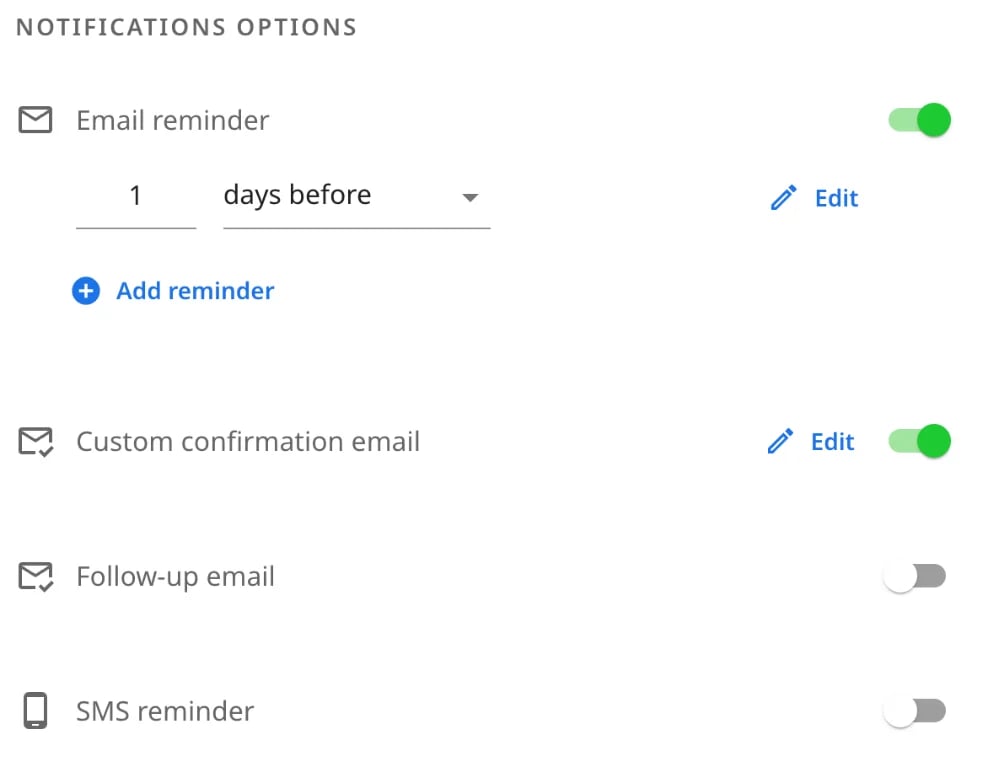
The reminders keep up when plans change. If a client moves the appointment with the link, the reminder moves with it. If they cancel, no reminder goes out, and the time opens up again on your booking page for someone else.
Try zcal free, or see how text reminders cut no-shows. For a coworker or a team, see our meeting reminder templates, and to welcome a client the moment they book, use these appointment confirmation templates.
Frequently asked questions
How do I write an appointment reminder?
What is a good appointment reminder message?
How far in advance should you send an appointment reminder?
Should I send appointment reminders by text or email?
Do I need permission to text appointment reminders?
Can I send appointment reminders for free?
Related Articles
There's a better way to schedule meetings
Join zcal freeWant unlimited booking links, polls and reminders for free?
Try zcal free