
18 Appointment Confirmation Templates for Email and Text
Published October 23, 2026

At a glance
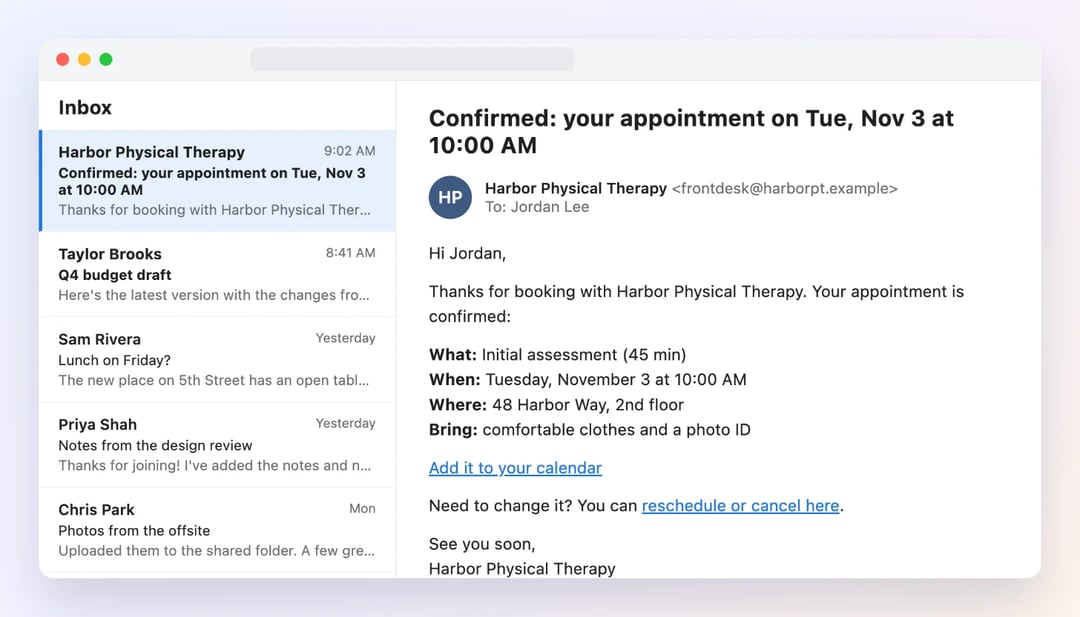
An appointment confirmation is the message a client gets right after they book. It says the appointment is set and gives the day, the time, the place and a way to change it. Below are 18 appointment confirmation templates, each with an email and a text version you can copy.
The moment after someone books, they have one question: "Did that go through?" A clear confirmation answers it in seconds. It also becomes the message your client searches for on the morning of the appointment, when they need your address or the video link. A vague one ("Thanks, see you then!") sends them digging through old messages, or calling you to ask.
Every template here comes in 2 versions: an email with all the details, and a short text for the client's phone. Click Copy, swap the [brackets] for your details, and send. At the end, you'll see how to send confirmations on their own, the second anyone books.
Table of contents
What is an appointment confirmation?
An appointment confirmation is a message that tells a client their booking is set. It goes out right after they book and gives the key details: the service, the day and time, the place or the video link, and how to reschedule or cancel. It's a receipt for their time, and the first thing they'll check later.
Appointment confirmation vs reminder
A confirmation and a reminder do different jobs, so most businesses send both.
| Confirmation | Reminder | |
|---|---|---|
| When it goes out | Right after the booking | 1 to 2 days before, and on the day |
| How many | 1 | 1 to 3 |
| Its job | Prove the booking worked, and give every detail | Make sure the client remembers and shows up |
| What it includes | Service, day, time, place or link, price, policy, what to bring, how to reschedule | Day, time, place or link, how to reschedule |
| Best channel | Email, with a short text if you have their number | Text, with an email for the details |
For reminders, use these appointment reminder templates.
"You're booked" or "please confirm"?
"Appointment confirmation" can mean 2 different messages, and it pays to know which one you need.
- A booking confirmation says "You're booked." Send it when the client picked the time themselves, for example on your booking page. They already said yes, so don't ask them to confirm again.
- A request to confirm says "Can you confirm you're coming?" Send it when you or your staff booked the time for the client, for example over the phone, or when the appointment is weeks away. It catches the "Wait, I said Tuesday?" problem before the day.
Templates 1 to 14 below are booking confirmations. Templates 15 and 16 ask the client to confirm.
What to include in an appointment confirmation
A confirmation should give your client everything they need to show up, in a form they can find again in 2 weeks. Put the day and the time in the subject line, so they can find it with a quick search of their inbox.
- What they booked. The service and, if you have a team, who it's with: "a 60-minute massage with Maya".
- The day, the date and the time. "Tuesday, November 3 at 10:00 AM." For an online appointment, give the time zone, or the time in the client's own zone.
- Where. The full address with the suite or floor, and a word on parking. For a video call, the link itself.
- The price, if there is one. Say what's paid and what's due at the visit.
- What to bring or do first. A form, an ID, a list of questions.
- How to reschedule or cancel, and your cancellation policy in one line, if you have one.
- A way to add it to their calendar. An "Add to calendar" link or a calendar invite means one less reason to forget.
When to send it
Send the confirmation right away, within a few minutes of the booking. The client is still thinking about you, and a fast confirmation tells them your business is organized. If you text it too, keep it under 160 characters so it arrives as 1 message, and leave out emoji, which drop the limit to 70.
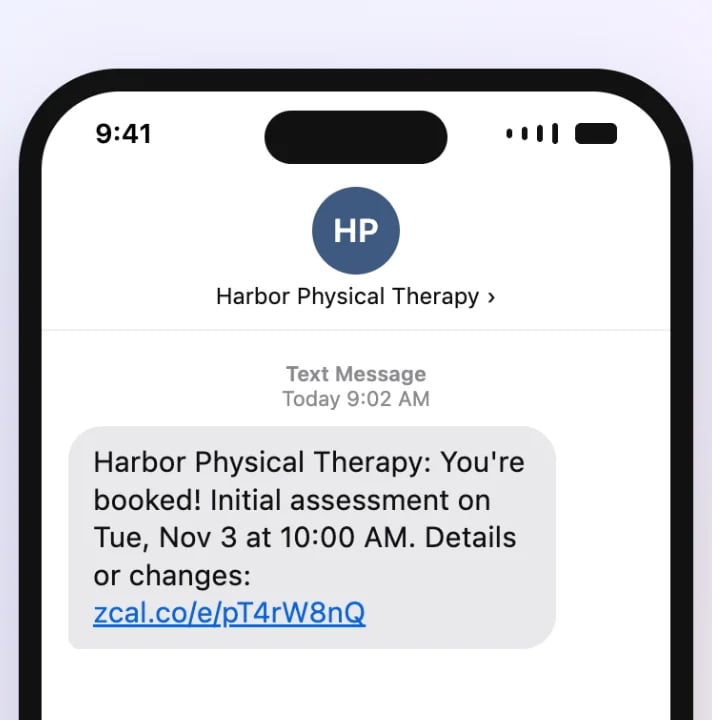
Only text clients who gave you their number for it, and stop at once if they ask you to.
Booking confirmation templates
Each template has an email version and a text version. The texts stay under 160 characters once you fill in short details, and they use only plain characters, so each one goes out as a single message.
1. Standard appointment confirmation
Use it for any booking, right after the client books.
Subject: Confirmed: your appointment on [day], [date] at [time]
Hi [first name],

Thanks for booking with [business]. Your appointment is confirmed:

What: [service]
When: [day], [date] at [time]
Where: [address]

Add it to your calendar: [calendar link]

Need to change it? You can reschedule or cancel here: [reschedule link]

See you soon,
[your name]
[business] | [phone]
[business]: You're booked! [service] on [day], [date] at [time]. Details or changes: [booking link]
2. Friendly and casual confirmation
Use it when your clients know you by your first name.
Subject: You're booked, [first name]! See you [day]
Hi [first name],

You're all set! I've got you down for [service] on [day] at [time], and I'm looking forward to it.

You'll find me at [address]. [parking note]

If anything changes, no stress. You can pick a new time here: [reschedule link]

See you soon,
[your name]
Hi [first name], it's [your name]! You're booked for [day] at [time]. Can't wait to see you. Changes? [reschedule link]
3. Formal confirmation
Use it for law, accounting, financial and other professional offices.
Subject: Appointment confirmation: [day], [date] at [time]
Dear [title] [last name],

This email confirms your appointment with [provider name] at [business]:

Date: [day], [date]
Time: [time]
Location: [address]

Please bring [documents]. If you need to reschedule, please contact our office at [phone] at least [notice] in advance, or use this link: [reschedule link]

Kind regards,
[your name]
[business]
[business]: This confirms your appointment with [provider name] on [date] at [time]. To reschedule, call [phone].
4. Online or video appointment
Use it for any appointment on Zoom, Google Meet or Microsoft Teams. Give the time in the client's zone, so nobody shows up an hour early.
Subject: Confirmed: our video call on [day] at [time] [time zone]
Hi [first name],

Our call is confirmed for [day], [date] at [time] [time zone] ([their time] your time).

Join here: [video link]

The link works in any browser, so there's nothing to install. Open it a few minutes early to check your camera and sound.

Need a different time? Reschedule here: [reschedule link]

Talk soon,
[your name]
Hi [first name], our call is set for [day] at [time] [time zone]. Join here: [video link] - [your name]
5. In-person appointment with directions
Use it when your place is hard to find, or parking takes planning.
Subject: See you [day] at [time]: how to find us
Hi [first name],

Your [service] is confirmed for [day], [date] at [time].

How to find us:
Address: [address]
Parking: [parking note]
Entrance: [entrance note]

If you're running late, call us at [phone], and we'll do our best to fit you in.

To reschedule: [reschedule link]

See you soon,
[business]
[business]: Confirmed for [day] at [time] at [address]. Parking: [parking note]. Running late? Call [phone]
6. First appointment with a new client
Use it to welcome a new client and tell them what to expect.
Subject: Welcome to [business]! Your first visit is confirmed
Hi [first name],

Welcome! Your first appointment with [business] is confirmed for [day], [date] at [time].

Before you come:
1. Please fill in your new client form: [form link]
2. Plan to arrive [minutes] minutes early.
3. Your first visit takes about [length].

If you have any questions before then, just reply to this email.

To reschedule: [reschedule link]

We're glad you're here,
[your name]
[business]
[business]: Welcome, [first name]! Your first visit is [day] at [time]. Please fill in this form before you come: [form link]
7. Class, workshop or group session
Use it when the client books a spot in a class or event with other people.
Subject: Your spot is saved: [class] on [day] at [time]
Hi [first name],

Your spot in [class] on [day], [date] at [time] is saved.

Where: [address or video link]
Bring: [what to bring]

Spots are limited, so if you can't make it, please cancel by [cutoff time] so someone else can join: [cancel link]

See you there,
[your name]
[business]
[business]: Your spot in [class] on [day] at [time] is saved! Can't make it? Please cancel by [cutoff]: [cancel link]
8. Paid appointment or deposit
Use it when the client paid in full or left a deposit at booking.
Subject: Payment received: your appointment on [day] at [time]
Hi [first name],

Thank you! We've received your payment of [amount], and your appointment is confirmed.

Service: [service]
When: [day], [date] at [time]
Where: [address or video link]
Balance due at the visit: [balance]

Our cancellation policy: [policy in one line].

To reschedule or cancel: [reschedule link]

See you soon,
[business]
[business]: Payment received. Your [service] on [day] at [time] is confirmed. Receipt and details: [booking link]
Appointment confirmations for each type of business
9. Dental or medical appointment
Use it for dental, medical, eye and physical therapy visits. Keep health details out of the message.
Subject: Your appointment at [business] is confirmed: [day] at [time]
Hi [first name],

Your appointment with [provider name] is confirmed for [day], [date] at [time].

Address: [address]

Please bring:
1. Your insurance card and a photo ID
2. A list of any medicines you take

If you're a new patient, please fill in your forms before your visit: [form link]

To reschedule, call [phone] or use this link at least [notice] ahead: [reschedule link]

Thank you,
[business]
[business]: You're booked with [provider name] on [day] at [time]. Please bring your insurance card and ID. Changes: [reschedule link]
10. Salon, spa or barber
Use it for haircuts, color, nails, massage and other beauty services.
Subject: You're booked! [service] with [stylist name] on [day]
Hi [first name],

Thanks for booking! Your [service] with [stylist name] is confirmed for [day], [date] at [time].

Good to know:
1. Please arrive 5 minutes early, so your full time is yours.
2. [prep note, for example: come with clean, dry hair]
3. Need to change your time? Please let us know at least [notice] ahead.

Reschedule or cancel: [reschedule link]

See you soon,
[business]
[business]: You're booked with [stylist name] on [day] at [time]! To change it, please let us know [notice] ahead: [reschedule link]
11. Therapy or counseling session
Use it for therapy and other private sessions. Say as little as you need in the message.
Subject: Your appointment on [day] at [time]
Hi [first name],

Your appointment on [day], [date] at [time] is confirmed.

[Location: address / Join online: video link]

If you need to change the time, you can reschedule here: [reschedule link]

Take care,
[your name]
Hi [first name], this is [your name]. Your appointment on [day] at [time] is confirmed. To reschedule: [reschedule link]
12. Coaching or consulting call
Use it for coaching, consulting and advisory calls. Ask one question, so the client comes ready.
Subject: Confirmed: our call on [day] at [time] [time zone]
Hi [first name],

Thanks for booking a call! We're set for [day], [date] at [time] [time zone].

Join here: [video link]

To make the most of our time, please send me one sentence about what you'd like to get out of the call. Just reply to this email.

Need a different time? Reschedule here: [reschedule link]

Talk soon,
[your name]
Hi [first name], our call is confirmed for [day] at [time] [time zone]. Join: [video link] - [your name]
13. Home service visit
Use it for cleaning, repairs and installs. Confirm a time window and how you'll get in.
Subject: Confirmed: [service] on [day] between [start time] and [end time]
Hi [first name],

Your [service] is booked for [day], [date] between [start time] and [end time]. [your name] will do the work.

To help us start on time, please reply with:
1. Any gate code or parking notes
2. Any pets we should know about

We'll text you when we're on the way. Need a different day? Reschedule here: [reschedule link]

Thanks,
[business] | [phone]
[business]: Your [service] is booked for [day], [start] to [end]. We'll text when we're on the way. Changes: [reschedule link]
14. Tutoring or music lesson
Use it for lessons, written to the parent when the student is a child.
Subject: [student name]'s lesson is booked: [day] at [time]
Hi [first name],

[student name]'s [subject] lesson is booked for [day], [date] at [time].

Where: [address or video link]
Please bring: [what to bring]

If you need to move the lesson, you can pick a new time here: [reschedule link]

Thanks,
[your name]
Hi [first name], [student name]'s [subject] lesson is booked for [day] at [time]. To move it: [reschedule link] - [your name]
Templates that ask the client to confirm
15. Please confirm your appointment
Use it when you or your staff booked the time for the client, or when the appointment is weeks away. A text from your own phone collects the replies.
Subject: Please confirm your appointment on [day] at [time]
Hi [first name],

We have you booked for [service] on [day], [date] at [time].

Could you reply to confirm that this time works for you? If it doesn't, you can choose another time here: [reschedule link]

Thank you,
[your name]
[business] | [phone]
[business]: Hi [first name], we have you booked for [day] at [time]. Reply YES to confirm, or pick a new time: [reschedule link]
16. No reply yet
Use it 1 day after a request to confirm, when you heard nothing back.
Subject: Still good for [day] at [time]?
Hi [first name],

Just checking in: we haven't heard back about your appointment on [day] at [time].

If you're coming, a quick "yes" is all we need. If the time doesn't work, please pick another one, so we can offer this spot to someone else: [reschedule link]

Thanks,
[your name]
[business]
[business]: Hi [first name], still good for [day] at [time]? Reply YES, or pick another time: [reschedule link]
Confirmations for changes
17. Rescheduled appointment
Use it when an appointment moves, so nobody shows up at the old time. If you need to ask the client first, use these reschedule email templates.
Subject: Updated: your appointment is now [new day] at [new time]
Hi [first name],

Your appointment has been moved. Here are the new details:

New time: [new day], [date] at [new time]
Old time: [old day] at [old time] (canceled)
Where: [address or video link]

Your calendar invite has been updated. If the new time doesn't work, you can choose another one here: [reschedule link]

See you then,
[your name]
[business]
[business]: Your appointment moved to [new day] at [new time] (not [old day]). Details: [booking link]
18. Cancellation confirmation
Use it when a client cancels, to close the loop and invite them back.
Subject: Canceled: your appointment on [day] at [time]
Hi [first name],

Your appointment on [day], [date] at [time] has been canceled.

[If a refund or a fee applies, say so here in one line.]

We'd love to see you another time. When you're ready, you can book here: [booking link]

Thanks,
[your name]
[business]
[business]: Your appointment on [day] at [time] is canceled. We hope to see you soon! Book again any time: [booking link]
Send confirmations automatically with zcal
A confirmation works best when it lands seconds after the booking, and that's the one moment you can't be there, because clients book at 11 PM on a Sunday. zcal, a free scheduling app, sends the confirmation for you: clients pick a time on your booking page, and the confirmation is in their inbox before they close the tab.
- On the free plan, every booking gets a confirmation email right away. It has the appointment name, the date and time in the client's own time zone, the place or the video link, links to add it to Google Calendar, Outlook or Apple Calendar, and a link to cancel or reschedule. The appointment also lands on your own calendar, so nobody else can book that time.
- On Pro, from $7 a month, you can write the confirmation in your own words, with your client's name, the appointment and the time filled in for you. Paste in any template above, and every client gets your version. Pro also adds up to 5 email reminders and a text reminder before each appointment.
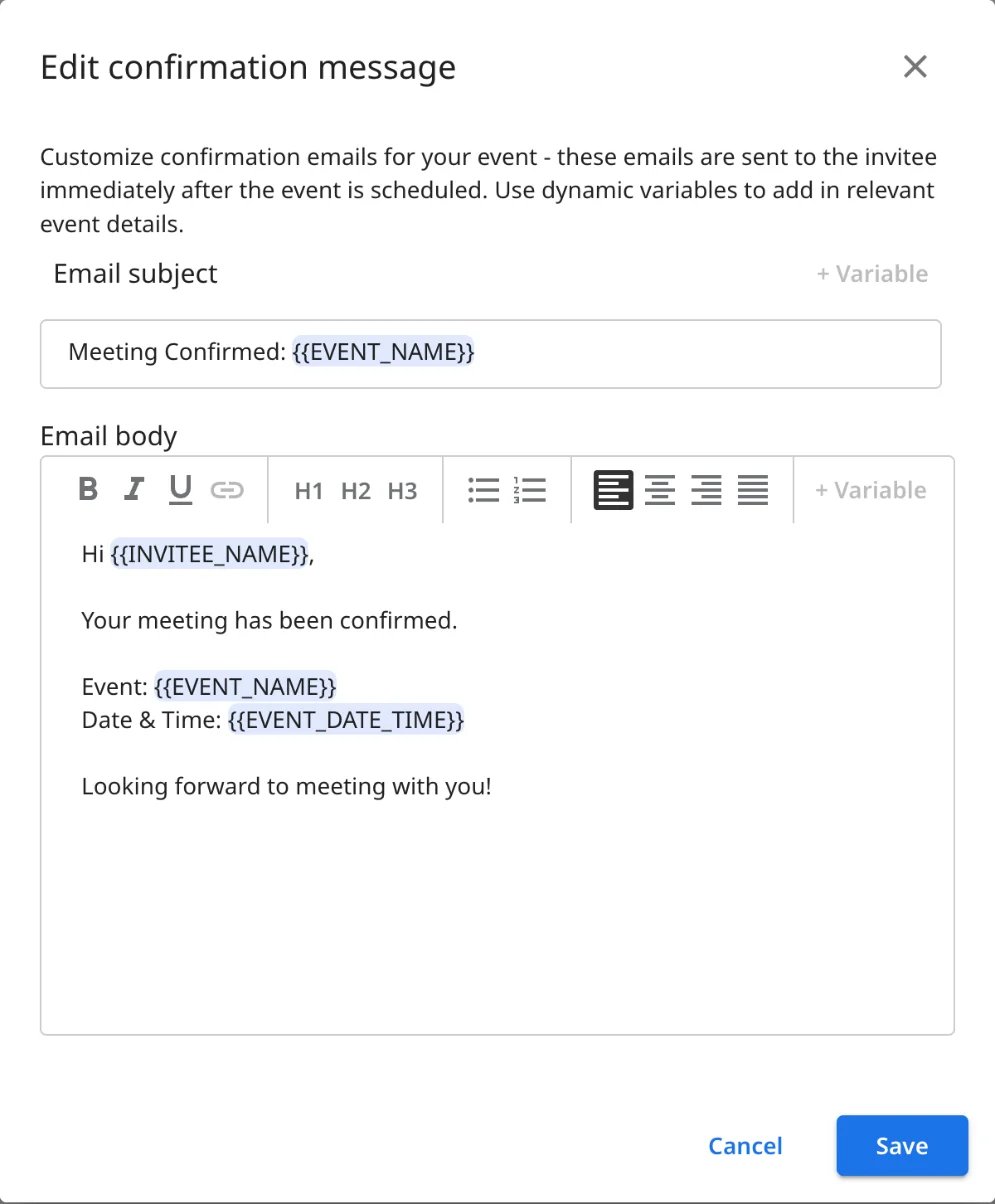
When a client reschedules with the link, zcal sends the updated details and moves the appointment on your calendar. You write the confirmation once, and it goes out, right every time, for every booking.
Try zcal free, or see the appointment reminder templates to send before the day.
Frequently asked questions
What do you say to confirm an appointment?
How do I write an appointment confirmation text?
How do I confirm an appointment politely?
How do I reply to confirm my appointment?
What's the difference between an appointment confirmation and a reminder?
Should an appointment confirmation include a cancellation policy?
Related Articles
There's a better way to schedule meetings
Join zcal freeWant unlimited booking links, polls and reminders for free?
Try zcal free