
Is Calendly Free? Calendly Pricing and Free Plan Limits (2026)
Published October 21, 2026

At a glance
Calendly has a free plan, and it never expires, but it's limited to 1 active event type and 1 connected calendar, with no reminders. Everything else starts at $10 per seat a month, billed yearly, or $12 billed monthly.
That's enough if all you need is one booking link for one kind of call. Most people outgrow it fast. The moment you want a short intro call and a longer paid session, a second calendar, or a reminder that cuts no-shows, Calendly asks you to upgrade. Below is every Calendly plan and price for 2026, what the free plan includes, where its limits are, and what a team really pays. New to Calendly? Start with what Calendly is and how it works.
Table of contents
Calendly pricing in 2026
Calendly has a free plan and 5 paid plans. Every paid plan is priced per seat, so a team of 5 pays 5 times the price.
| Plan | Billed yearly | Billed monthly | What it adds |
|---|---|---|---|
| Free | $0 | $0 | 1 event type and 1 calendar |
| Standard | $10 per seat a month | $12 per seat a month | Unlimited event types, reminders, payments, more calendars |
| Standard Plus | $18 per seat a month | $24 per seat a month | Standard, plus Notetaker and the Callie AI assistant |
| Teams | $16 per seat a month | $20 per seat a month | Round robin, team scheduling, lead routing, Salesforce |
| Teams Plus | $24 per seat a month | $32 per seat a month | Teams, plus Notetaker and Callie |
| Enterprise | From $15,000 a year | Yearly only | SSO, admin and security controls, for 50 seats or more |
The "Plus" plans are Standard and Teams with an AI notetaker that records and sums up your meetings, and Callie, an assistant that books meetings over email. Each one costs $8 more per seat a month billed yearly, or $12 more billed monthly.
What does Calendly's free plan include?
Calendly calls it the Free plan, and it's free forever, not a trial. Here's what you get:
- 1 active event type, such as a 30-minute call, with no limit on how many people book it.
- 1 connected calendar (Google, Outlook, Office 365 or iCloud), so nobody books you when you're busy.
- Video links for Zoom, Google Meet and Microsoft Teams, added to every booking.
- Unlimited meeting polls, where a group votes on the best time.
- A booking page you can share as a link or embed on your website.
- The Calendly mobile app and browser extension.
That covers a freelancer who takes one kind of call. It doesn't cover much else.
What are the limits of Calendly's free plan?
We tested the free plan in a real Calendly account, and it felt less like a free plan than a trial that never ends. Almost everything we reached for opened the same upgrade box, with "Subscriptions starting at $10 per user/month".
Only 1 event type at a time
You can make more event types, but only one can be on. When we tried to turn on a second one, Calendly showed: "Multiple event types are not available on your Free plan."
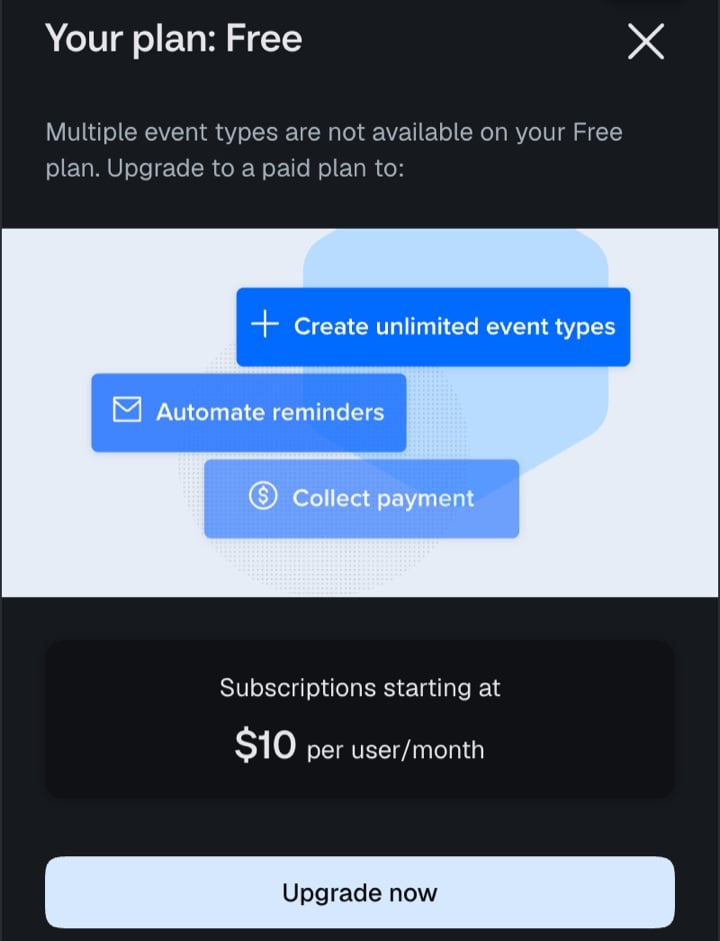
So you can't offer a 15-minute intro call and a 60-minute session side by side. You have to pick one, or pay. zcal, a free scheduling app, has no limit on booking links on its free plan, so every kind of meeting gets its own link.
Only 1 calendar
Calendly checks one calendar for conflicts. If you keep a work calendar and a personal one, the other one is invisible, and people can book you during the dentist. Connecting a second calendar showed: "Multiple calendar connections are not available on your Free plan." zcal checks as many Google, Outlook and Apple calendars as you connect, on the free plan.
No reminders
Reminder emails and follow-ups are Calendly Workflows, and Workflows are paid. On the free plan, the "Email reminder to invitee" template can't be added. People get the calendar invite, and that's it. zcal's free plan sends an email reminder before every meeting, and its Pro plan adds text reminders.
No group events, round robin or collective events
Classes, webinars and workshops need a group event type: "Group event types are not available on your Free plan." Collective events, with several hosts in one meeting, start on Standard at $10 per seat a month. Round robin, which shares new meetings across a team, needs Teams at $16. zcal's free plan includes group events for up to 5 people per time slot, and its Pro plan adds round robin and collective events for $7 per user a month.
No payments
Taking payment when someone books needs Stripe or PayPal, and both are on the paid plans. If you sell sessions, you pay Calendly before your clients pay you. zcal's free plan connects to Stripe, so clients can pay when they book.
Is Calendly free forever, or is it a free trial?
Both. Every new Calendly account starts with a free 2-week trial of Teams Plus, the second most expensive plan. When the trial ends, the account moves to the Free plan on its own, and you aren't charged.
The catch is what you lose. Calendly turns off the paid features, such as Automations and extra users. And because the Free plan allows 1 active event type, any others stay in your list switched off, like the second one in our test account, with a "Turn On" button that leads to the upgrade box. If you built your setup during the trial, check which Calendly links still work before you share them.
How much does Calendly cost for a team?
This is what Calendly costs for 1 year, billed yearly. Monthly billing costs more: $12 a seat for Standard and $20 for Teams.
| People | Standard ($10) | Teams ($16) | Teams Plus ($24) | zcal Pro ($7) |
|---|---|---|---|---|
| 1 | $120 a year | $192 a year | $288 a year | $84 a year |
| 5 | $600 a year | $960 a year | $1,440 a year | $420 a year |
| 30 | $3,600 a year | $5,760 a year | $8,640 a year | $2,520 a year |
The plan matters as much as the price. A team that shares new leads with round robin needs Calendly Teams, not Standard. A team of 5 then pays $960 a year on Calendly and $420 on zcal Pro, which includes round robin and collective events.
Hidden costs to know about
- Empty seats still cost money. Calendly bills every seat you buy, filled or not.
- Monthly billing costs up to a third more. Teams Plus is $24 a seat billed yearly and $32 billed monthly.
- The AI features add $8 to $12 per seat. Notetaker and Callie come only with the Plus plans.
- Round robin needs Teams. Standard has no round robin, so a sales team pays the higher price.
- SSO is an add-on. On Teams, single sign-on is an extra, and Enterprise starts at $15,000 a year for at least 50 seats.
- Downgrades wait for the bill. A downgrade or a removed seat starts at the end of your billing cycle.
Calendly Free vs zcal Free
If you came here to see whether you can schedule for free, this is the comparison that matters. Both plans are free forever, with no credit card.
| Calendly Free | zcal Free | |
|---|---|---|
| Booking links (event types) | 1 active | Unlimited |
| Connected calendars | 1 | Unlimited |
| Email reminders | No | Yes |
| Group events | No | Yes, up to 5 people per time slot |
| Take payments | No | Yes, with Stripe |
| Meeting polls | Yes | Yes |
| Video links (Zoom, Google Meet, Teams) | Yes | Yes |
| Cover photo and welcome video on your booking page | No | Yes |
| Round robin | Teams plan, $16 per seat | Pro plan, $7 per user |
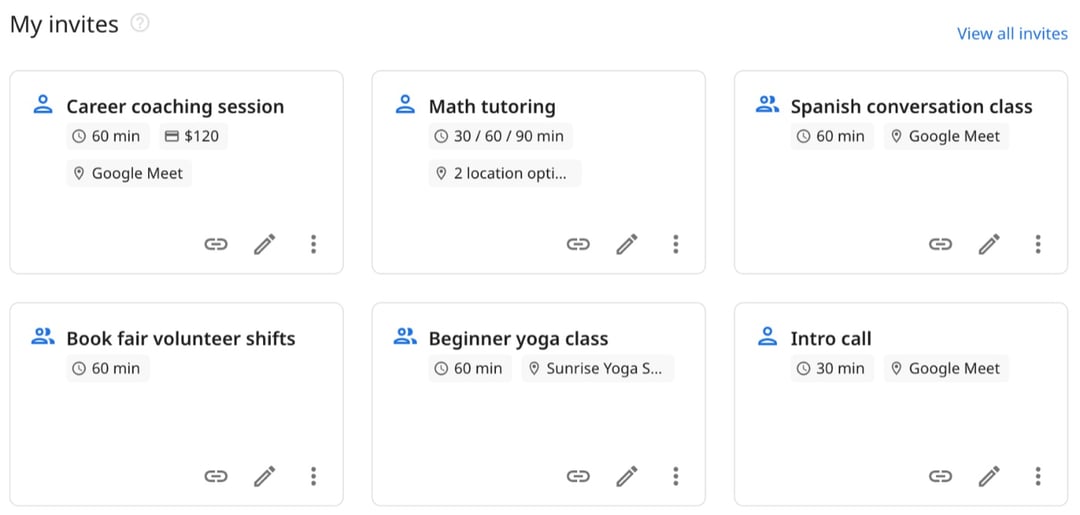
On zcal's free plan, the same account can run an intro call, a paid session, a weekly class and a team sign-up sheet, each with its own link. On Calendly's free plan, it would be one of them. See the full comparison of Calendly alternatives, or zcal's plans and prices.
Is Calendly's free plan worth it?
It is if you need one booking link for one kind of meeting, from one calendar, and you don't mind sending your own reminders. A consultant who only takes 30-minute discovery calls can live on it.
It isn't if you need any of the things most businesses need sooner or later: a second meeting type, a second calendar, reminders, group sessions or payments. Then you either pay Calendly $10 to $12 per seat a month, or you move to a free plan that already includes them. zcal's does. See how it compares in our list of the best free scheduling apps.
Frequently asked questions
Can I use Calendly for free forever?
What are the limitations of a free Calendly account?
How much is Calendly per month?
Does Calendly charge per user?
Is yearly billing cheaper?
How do I switch to the free plan on Calendly?
How do I cancel my Calendly subscription?
Does Calendly's free plan include Zoom?
Which is better, Google Calendar or Calendly?
What are the downsides of Calendly?
What is the best free alternative to Calendly?
Related Articles
There's a better way to schedule meetings
Join zcal freeWant unlimited booking links, polls and reminders for free?
Try zcal free