
Calendly Link: How to Find, Share and Change Yours (2026)
Published October 22, 2026
At a glance
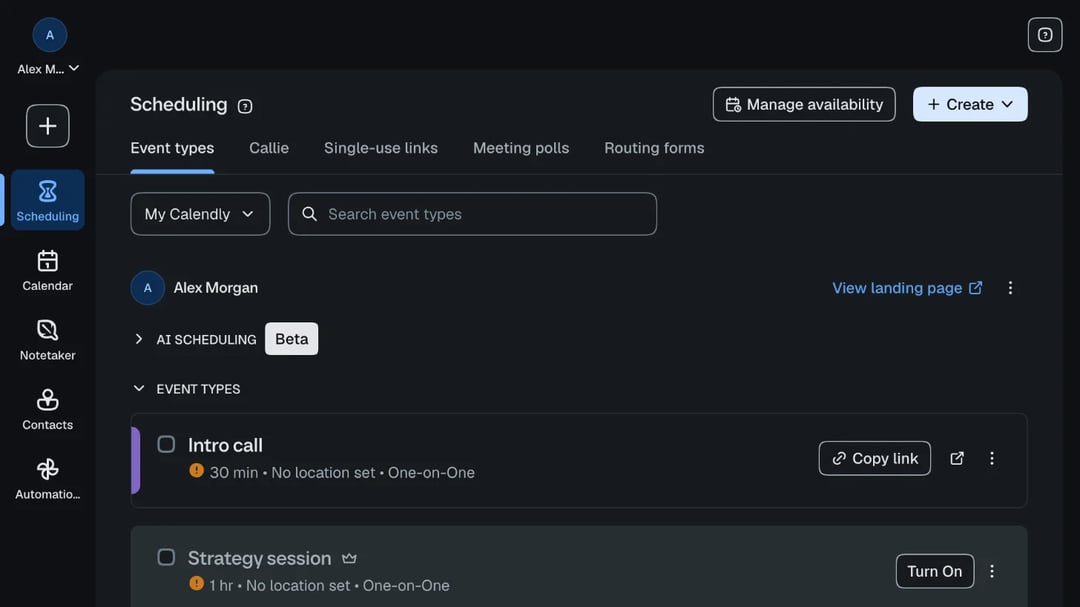
Your Calendly link is the web address of your booking page, such as calendly.com/alexmorgan. To find it, open Scheduling, then Event types in Calendly. Your main link is in the ⋮ menu next to "View landing page", and each meeting type has its own "Copy link" button.
That link is how people book time with you, so it's worth knowing where it lives, how to share it and how to change it. We went through every step in a real Calendly account in October 2026. Here's what we found, with screenshots, plus the reasons a Calendly link stops working.
Table of contents
What is a Calendly link?
A Calendly link takes people to a page where they can book a meeting with you. There are 3 kinds:
- Your main link, like calendly.com/alexmorgan. It opens a page that lists all your meeting types, and the guest picks one. Calendly calls it your landing page.
- An event link, like calendly.com/alexmorgan/intro-call. It goes straight to one meeting type, such as a 30-minute intro call, so the guest only picks a time.
- A single-use link. It works for one booking only. Calendly says single-use links "can only be booked once", so it's handy for a one-time call you don't want shared around.
Anyone can book from your link without a Calendly account. They pick a time, type their name and email, and the meeting lands on your calendar.
How to find your Calendly link
Sign in to Calendly and open Scheduling. The Event types tab lists your name at the top and your meeting types below it.
For your main link, click the ⋮ menu next to "View landing page", then Copy Link.

For one meeting type, click Copy link on its card. When you hover over a card, 3 more icons appear: "Book meeting", "Offer time slots" and "Create single-use link".
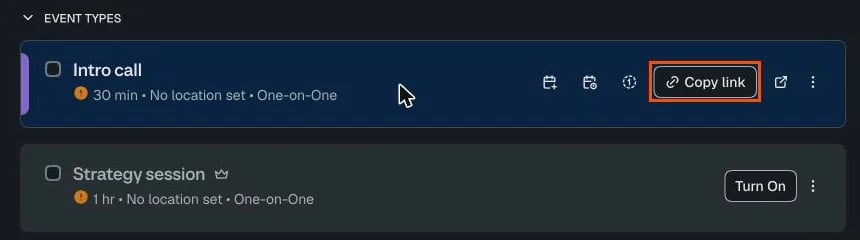
On Calendly's free plan, only 1 meeting type can be on at a time. If a card is greyed out with a "Turn On" button, its link won't take bookings until you turn it on, and on the free plan that means turning your other one off.
How to share your Calendly link
Once you've copied it, there are a few good places for it:
- In an email or chat. Paste the link into your reply instead of listing times. It works best after you've agreed to meet, so it doesn't read like a brush-off.
- With times in the email. Hover over an event card and click "Offer time slots". Calendly lets you "copy time slot suggestions and paste them into an email message", and your full booking link comes along too, so the other person can click a time right away.
- In your email signature. Add a line such as "Book a call with me" under your name, linked to your main page.
- On your website. In the ⋮ menu, "Add to website" gives you code to embed the booking page in a page, or to open it in a pop-up.
- As a one-time link. Use "Create single-use link" for a meeting that should only be booked once.
- In your social bios, such as LinkedIn or Instagram, if you take calls from new contacts.
What to write when you send it
A bare link can feel cold. One friendly line before it makes a big difference. Copy one of these and make it yours:
- After a sales call: "Great talking today. If you'd like a full demo for your team, pick any time that suits you here: [link]"
- To a new client: "Thanks for reaching out! The quickest way to find a time is my booking page, so grab whichever slot works best: [link]"
- For a job interview: "We'd love to meet you. Please choose a 30-minute slot for your first interview here: [link]"
- When you're the one asking: "No need to go back and forth. If one of these times works, just pick it, and it'll land on both our calendars: [link]"
How to change your Calendly link
To change your main link, open Settings, then My link under "My account". Type the new name after "calendly.com/" and click Save changes.
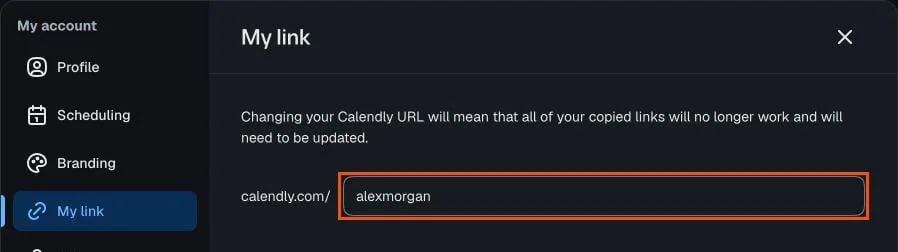
Read the warning first: "Changing your Calendly URL will mean that all of your copied links will no longer work and will need to be updated." Every link you've already sent, embedded or printed breaks, so update your signature and website the same day.
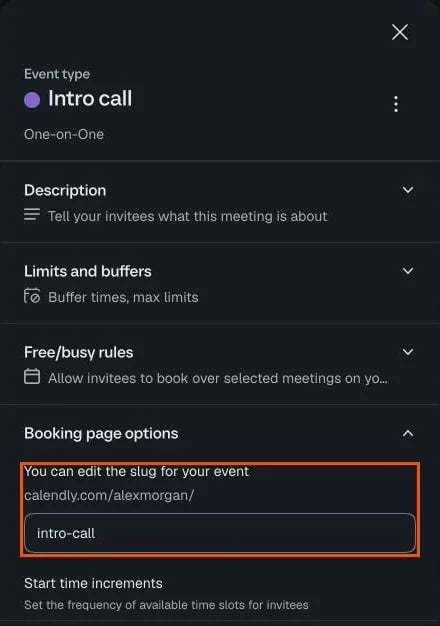
To change one meeting's link, open the event type, click More options, then Booking page options. Under "You can edit the slug for your event", change the last part of the link, such as "intro-call", and save.
How to find someone else's Calendly link
If someone uses Calendly, their link is usually close by:
- In their email signature or an earlier email from them.
- On their website, often on a "Contact" or "Book a call" page.
- In their LinkedIn or social profile.
- By asking. "Do you have a booking link?" is a normal question.
Why isn't my Calendly link working?
When a guest says your link is broken, check these first:
- The meeting type is off. On the free plan, only 1 can be on. A meeting type that's off doesn't take bookings.
- There are no open times. If your schedule has no hours left, the page shows no times. When we tried to offer times by email in a new account, Calendly said "No upcoming availability found for this event type".
- You changed your link. Old links stop working after a change of your main link or an event's slug.
- The link was single-use, and someone has already booked it.
- The link was copied wrong, with a missing letter or an extra space at the end.
Our take on Calendly links
In our test: finding and sharing a Calendly link was easy, but it took more hunting than it should. Your main link hides behind a ⋮ menu, the sharing tools hide until you hover over a card, and the page around them is crowded with AI features and upgrade buttons. The bigger catch is the free plan. You get one working meeting type, so your link can offer a 30-minute call or a 60-minute session, but not both.
A free booking link that does more: zcal
If you want a link like Calendly's without the limits, zcal is a free scheduling app that works the same way: connect your calendar, share your link, and people book your open times. On zcal's free plan:
- Every meeting type gets its own link, with no cap, so the intro call and the longer session can both be live.
- You choose the name in each link, such as zcal.co/alexmorgan/intro-call.
- Guests get an email reminder before the meeting, which cuts no-shows.
- Your booking page reflects your brand, with a cover photo, a welcome video and a short intro.
Create your free booking link, or compare zcal with other Calendly alternatives. New to Calendly itself? Start with what Calendly is and how it works.
Frequently asked questions
Is a Calendly link free?
Can I have more than one Calendly link?
Do people need a Calendly account to use my link?
Can I make a Calendly link for one meeting only?
What happens to my old Calendly link if I change it?
Related Articles
There's a better way to schedule meetings
Join zcal freeWant unlimited booking links, polls and reminders for free?
Try zcal free